<?xml version="1.0" encoding="utf-8"?><?xml-stylesheet type="text/xsl" href="atom.xsl"?>
<feed xmlns="http://www.w3.org/2005/Atom">
    <id>https://alertmanager.app/blog</id>
    <title>Alert Manager Enterprise Blog</title>
    <updated>2026-03-24T00:00:00.000Z</updated>
    <generator>https://github.com/jpmonette/feed</generator>
    <link rel="alternate" href="https://alertmanager.app/blog"/>
    <subtitle>Alert Manager Enterprise Blog</subtitle>
    <icon>https://alertmanager.app/img/ame/favicon.png</icon>
    <entry>
        <title type="html"><![CDATA[Alert Manager Enterprise for Electric Utilities: Simplifying NERC CIP Compliance Inside Splunk]]></title>
        <id>https://alertmanager.app/blog/ame-for-electric-utilities</id>
        <link href="https://alertmanager.app/blog/ame-for-electric-utilities"/>
        <updated>2026-03-24T00:00:00.000Z</updated>
        <summary type="html"><![CDATA[This article explains how Alert Manager Enterprise (AME) helps grid operators meet NERC CIP requirements without leaving their secure Splunk environment.]]></summary>
        <content type="html"><![CDATA[<p><img decoding="async" loading="lazy" alt="AME for Electric Utilities" src="https://alertmanager.app/assets/images/ame-for-electric-utilities-68118b8b5e105bef4c7731b52c34700b.png" width="1264" height="816" class="img__Ss2"></p>
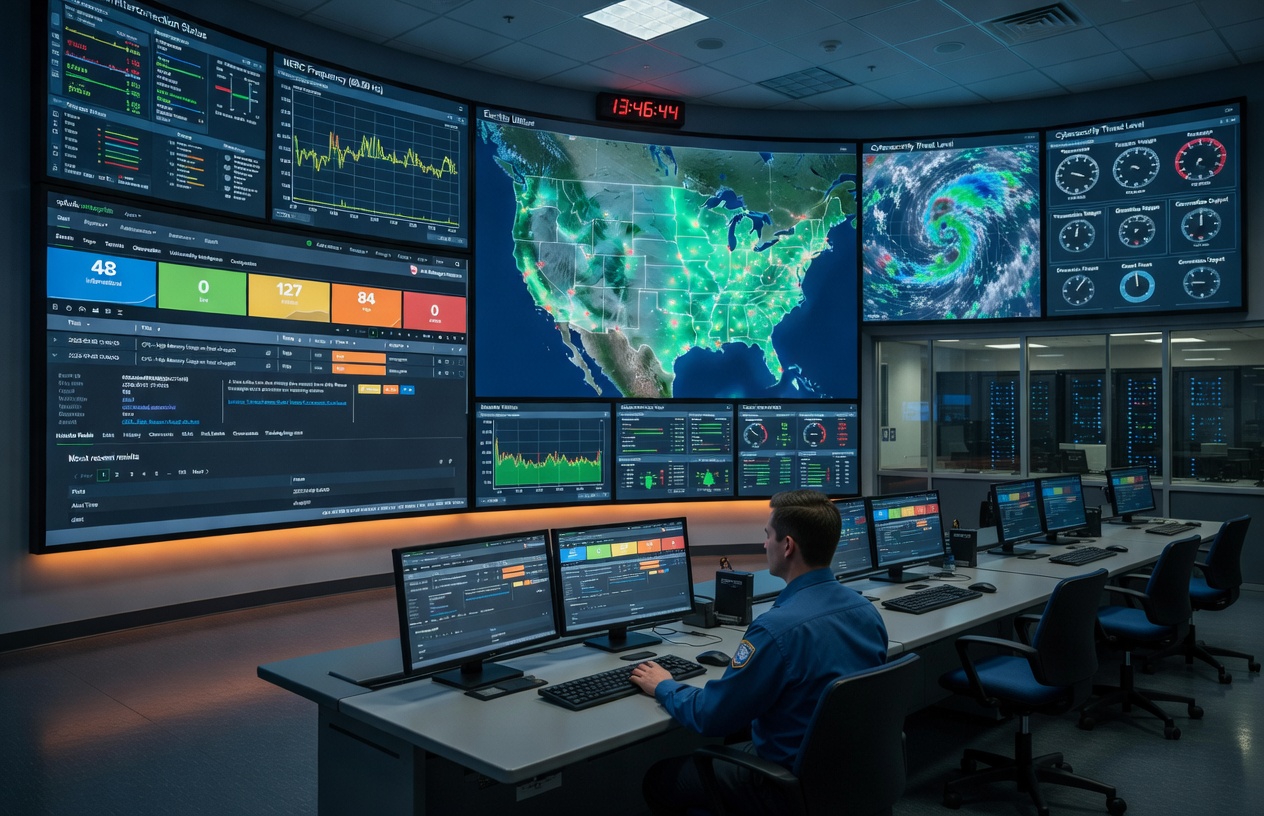
<p>Electric utilities face some of the world's strictest cybersecurity mandates. <a href="https://www.nerc.com/standards/reliability-standards/cip" target="_blank" rel="noopener noreferrer" class="">NERC CIP standards</a> require continuous monitoring, rigorous access controls, fully auditable incident handling, and strict separation of critical assets - all without ever moving sensitive data outside your secure perimeter.</p>
<p>Alert Manager Enterprise (AME) helps grid operators meet these requirements with a structured, auditable alert lifecycle that stays entirely inside their existing Splunk environment.</p>
<p>If you already use Splunk for visibility and alerting, AME turns your current Splunk alerts into compliant workflows - without external tools, data egress, or heavy custom development.</p>
<p>No new consoles. No compliance gaps. Just reliable event management that supports grid protection and simplifies audits.</p>
<h2 class="anchor anchorTargetStickyNavbar_SAay" id="the-reality-for-utility-soc-and-operations-teams">The Reality for Utility SOC and Operations Teams<a href="https://alertmanager.app/blog/ame-for-electric-utilities#the-reality-for-utility-soc-and-operations-teams" class="hash-link" aria-label="Direct link to The Reality for Utility SOC and Operations Teams" title="Direct link to The Reality for Utility SOC and Operations Teams" translate="no">​</a></h2>
<p>Splunk is already used in many utility environments for visibility and alerting. Yet turning raw alerts into compliant, team-ready event workflows remains challenging:</p>
<ul>
<li class="">Teams must see only the events and assets relevant to their role</li>
<li class="">NERC vs. non-NERC assets and data needs clear separation</li>
<li class="">Triage, assignment, annotation, and status tracking must happen inside the secure NERC perimeter</li>
<li class="">Full change history and exportable records are essential for audits</li>
<li class="">Manual tracking of alert ownership, comments, and status changes often leads to incomplete audit evidence and findings during NERC audits</li>
</ul>
<p>External incident management tools introduce compliance friction (data egress, scope expansion). Heavy custom development inside Splunk often becomes fragile over time.</p>
<h2 class="anchor anchorTargetStickyNavbar_SAay" id="alert-manager-enterprise---built-for-electric-utilities">Alert Manager Enterprise - Built for Electric Utilities<a href="https://alertmanager.app/blog/ame-for-electric-utilities#alert-manager-enterprise---built-for-electric-utilities" class="hash-link" aria-label="Direct link to Alert Manager Enterprise - Built for Electric Utilities" title="Direct link to Alert Manager Enterprise - Built for Electric Utilities" translate="no">​</a></h2>
<p>Our AME App is a native Splunk application that helps regulated grid operators manage alerts and events effectively. It integrates directly into Splunk Enterprise and Splunk Cloud. This means that your alerts and events stay in Splunk, and management happens within the same environment.</p>
<p>AME elevates standard Splunk alerts into a structured, auditable lifecycle that supports NERC CIP requirements while reducing manual effort for operations, security, and compliance teams. For a deeper look at day-to-day event handling, see the documentation on <a class="" href="https://alertmanager.app/docs/ame-event-summary-working-with-events">working with events</a>.</p>
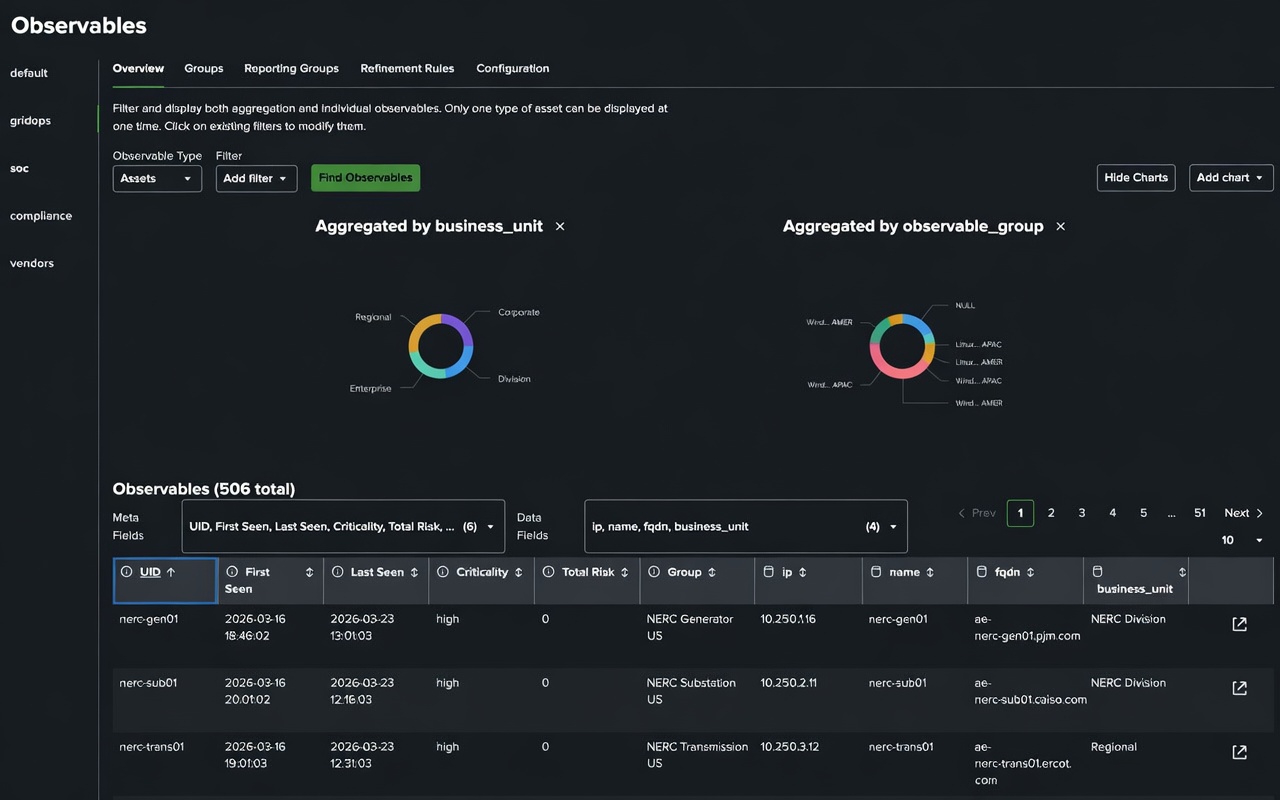
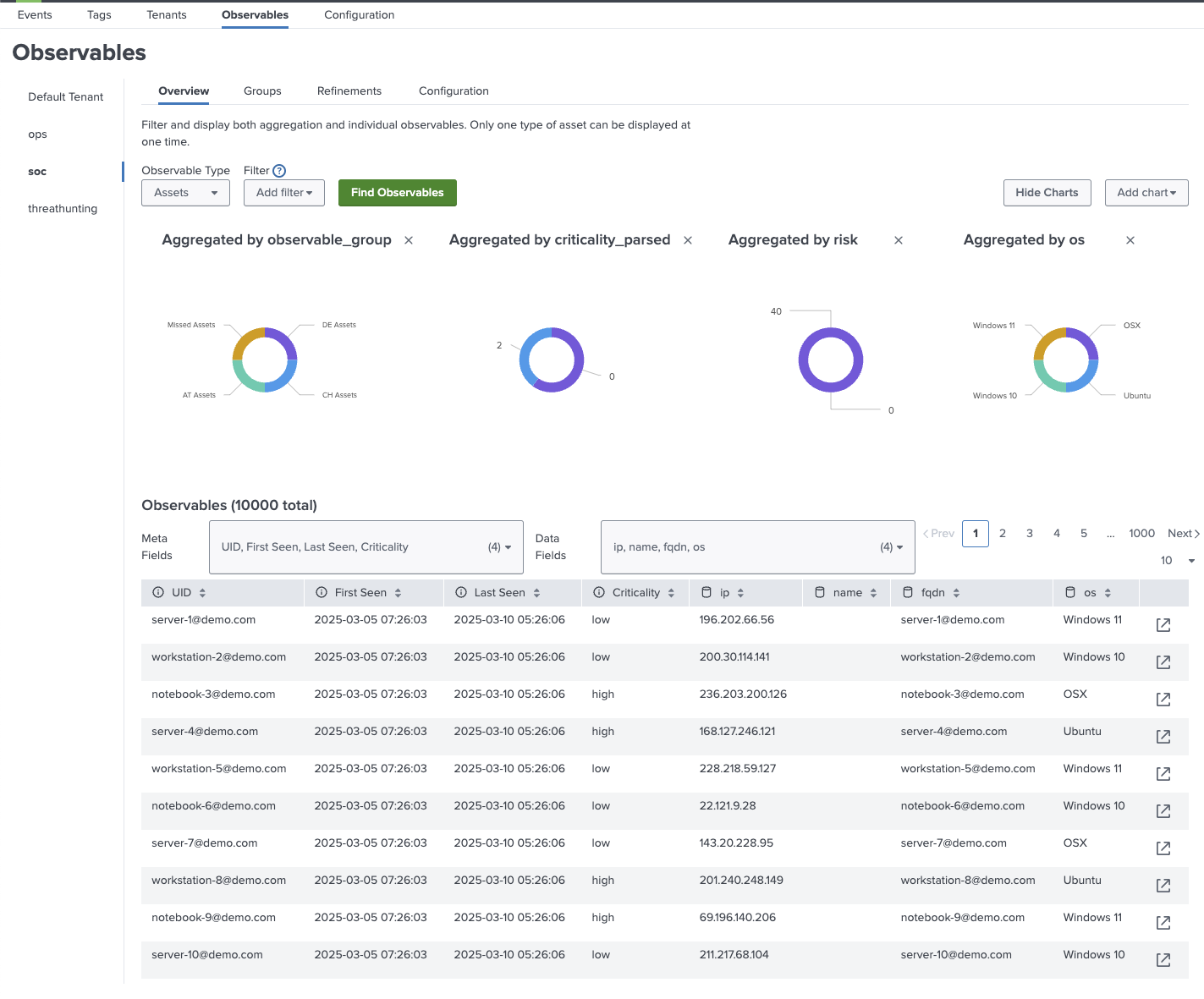
<p>A key strength for utilities is the <a class="" href="https://alertmanager.app/docs/ame-observables-usage">Observables</a> framework, which lets you manage assets and identities by tenant. Observables are used to enrich events with asset and identity information (e.g. asset owner, criticality, location and so on). This provides deeper asset context per team or asset group, strengthens correlation for investigations, and aligns perfectly with CIP-002 asset categorization and CIP-007 monitoring needs - all while maintaining strict multitenancy isolation.</p>
<figure style="margin:1.75rem auto 2rem;text-align:center"><img src="https://alertmanager.app/img/blog/ame-for-electric-utilities-observables.png" alt="Observables" width="700" style="display:block;margin:0 auto"><figcaption style="margin-top:0.75rem;font-size:0.95rem;color:var(--ifm-color-emphasis-700)"><p>AME Observables enrich events with asset and identity context while preserving tenant isolation.</p></figcaption></figure>
<p>Key alignments utilities rely on:</p>
<table><thead><tr><th>NERC CIP Standard</th><th>Focus Area</th><th>Core Obligation</th><th>How AME Delivers</th><th>Everyday Value for Utility Teams</th></tr></thead><tbody><tr><td><strong>CIP-005-7</strong></td><td>Electronic Security Perimeter</td><td>Strict electronic security perimeters and controlled access to BES Cyber Systems</td><td><a class="" href="https://alertmanager.app/docs/ame-tenants">Multitenancy</a> + granular RBAC on events</td><td>Teams view only their assigned assets; oversight roles maintain full visibility without violating rules</td></tr><tr><td><strong>CIP-007-6</strong></td><td>Systems Security Management</td><td>Systems security management, access control, and need-to-know principles</td><td><a class="" href="https://alertmanager.app/docs/ame-tenants">Multitenancy</a> + granular RBAC on events</td><td>Teams view only their assigned assets; oversight roles maintain full visibility without violating rules</td></tr><tr><td><strong>CIP-002-5.1a</strong></td><td>Asset Categorization</td><td>Identification and categorization of BES Cyber Systems</td><td>Dedicated dashboards with simple BES Cyber System / non-BES toggles (High/Medium/Low impact)</td><td>Clean, focused views for grid operations; no endless searching</td></tr><tr><td><strong>CIP-007-6</strong></td><td>Event Monitoring &amp; Detection</td><td>Continuous monitoring, logging, and detection of events on BES Cyber Systems</td><td>Live dashboards, automatic deduplication, Security Pack (MITRE ATT&amp;CK mapping, risk scoring)</td><td>Prioritized, lower-noise alerts; quicker anomaly response</td></tr><tr><td><strong>CIP-015-1</strong></td><td>Internal Network Security Monitoring (INSM)</td><td>Security event logging, analysis, and detection of anomalous activity inside Electronic Security Perimeters</td><td>Live dashboards, automatic deduplication, Security Pack (MITRE ATT&amp;CK mapping, risk scoring)</td><td>Prioritized, lower-noise alerts; quicker anomaly response and improved dwell-time detection</td></tr><tr><td><strong>CIP-008-6</strong></td><td>Incident Reporting &amp; Response</td><td>Review, triage, document, and track Cyber Security Incidents</td><td>Native Splunk lifecycle: assign, comment, tag, update status, link observables</td><td>Full triage and annotation stays inside the compliant Splunk instance</td></tr><tr><td><strong>CIP-008-6</strong></td><td>Response &amp; Audit Evidence</td><td>Timely notifications, traceable actions, and evidence for reporting</td><td>SLA timers, multi-channel notifications, complete per-event history</td><td>Defensible, export-ready audit trails with one-click evidence packages — dramatically reducing audit preparation time</td></tr><tr><td><strong>CIP-003-9</strong></td><td>Vendor Remote Access Oversight</td><td>Oversight of vendor electronic remote access, including detection of malicious communications</td><td>Scoped views and alerts for vendor-related activity</td><td>Early awareness of vendor access/activity without introducing new tools or expanding attack surface</td></tr></tbody></table>
<h2 class="anchor anchorTargetStickyNavbar_SAay" id="sla-management--enterprise-ticketing-integration">SLA Management &amp; Enterprise Ticketing Integration<a href="https://alertmanager.app/blog/ame-for-electric-utilities#sla-management--enterprise-ticketing-integration" class="hash-link" aria-label="Direct link to SLA Management &amp; Enterprise Ticketing Integration" title="Direct link to SLA Management &amp; Enterprise Ticketing Integration" translate="no">​</a></h2>
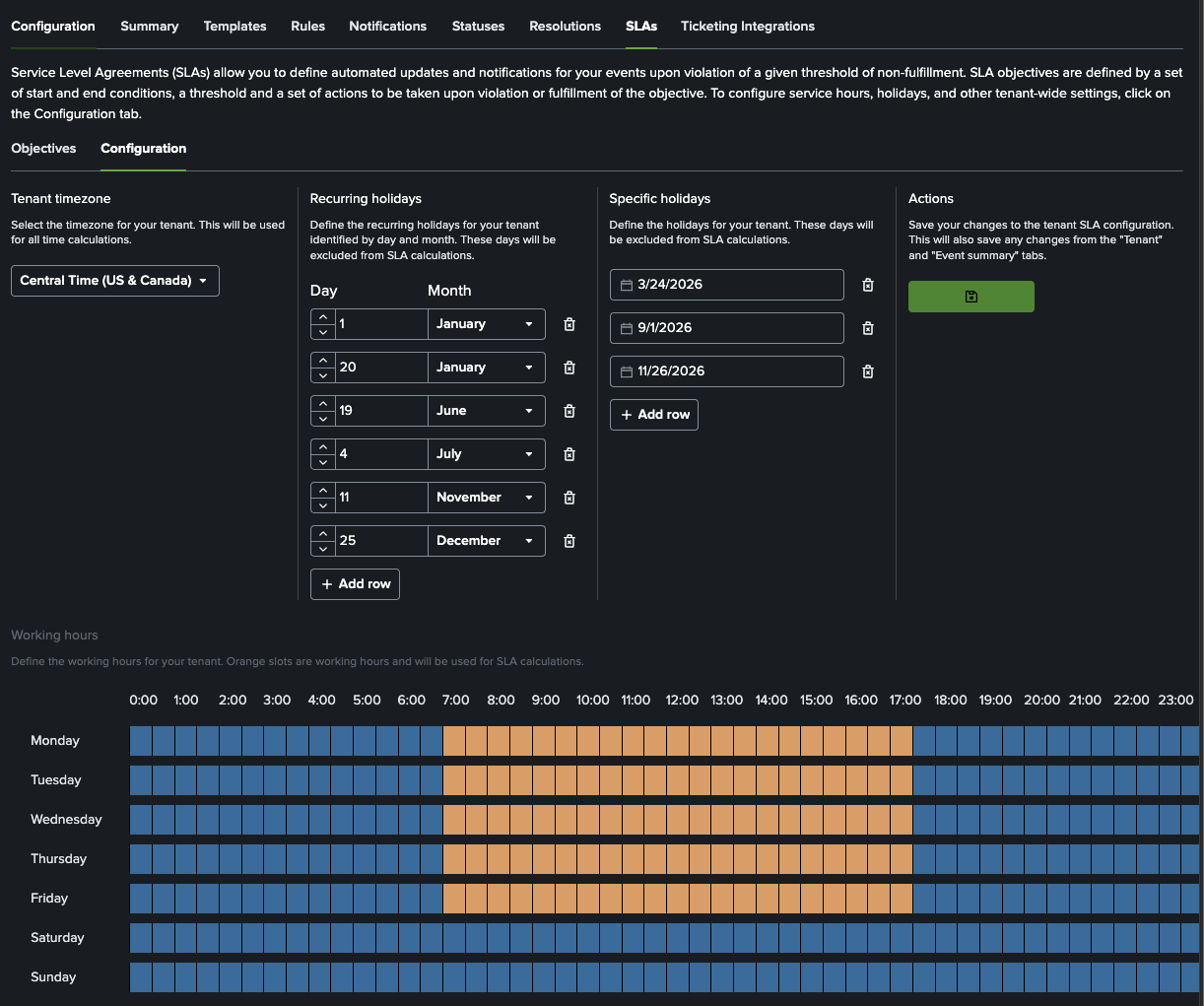
<p>AME includes built-in <a class="" href="https://alertmanager.app/docs/ame-event-summary-working-with-events#managing-slas">SLA timers</a> with visual countdowns, escalation rules, and automated notifications - giving operations and compliance teams clear visibility into response deadlines. This directly supports timely incident handling under NERC CIP-008 while reducing the risk of missed SLAs during audits.</p>
<figure style="margin:1.75rem auto 2rem;text-align:center"><img src="https://alertmanager.app/img/blog/ame-for-electric-utilities-slas.png" alt="SLAs" width="700" style="display:block;margin:0 auto"><figcaption style="margin-top:0.75rem;font-size:0.95rem;color:var(--ifm-color-emphasis-700)"><p>Built-in SLA timers make response deadlines visible and easier to defend during audits.</p></figcaption></figure>
<p>For utilities that still need to create tickets in Jira or ServiceNow, AME offers native <a class="" href="https://alertmanager.app/docs/ame-event-summary-working-with-events#start-ticketing-integration">ticketing integration</a>. Events can be pushed to the ticketing platform with full context and observables, while status updates (e.g. “Resolved”, “Closed”) are automatically synced back into Splunk - keeping the authoritative audit trail inside your secure Splunk environment.</p>
<p>This hybrid approach gives you the best of both worlds: compliant, auditable workflow management in Splunk + seamless process alignment with the rest of the enterprise.</p>
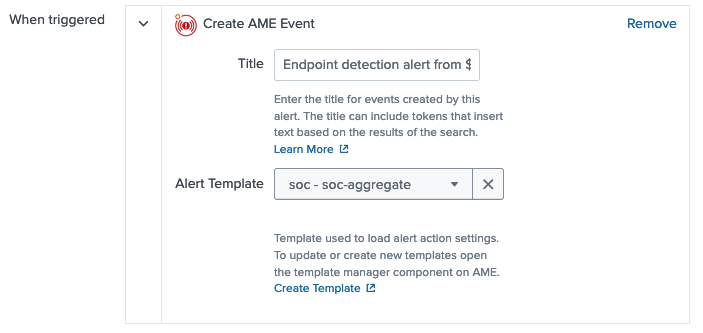
<p>AME works by adding an Alert Action to your existing Splunk searches. Alerts trigger and are turned into events that are managed in the Splunk UI. <a class="" href="https://alertmanager.app/docs/ame-event-automation">Notifications and event automation</a> can integrate externally when needed, but core event data and management remain in Splunk. It integrates seamlessly with your current Splunk alerts, searches, and retention settings, helping shift compliance from a separate task to an integrated part of daily grid protection work.</p>
<p>If your utility manages segmented teams, needs traceable alert workflows, or is preparing for evolving CIP requirements, AME offers a practical, low-friction path forward.</p>
<p><strong>Ready to see it in action?</strong></p>
<ul>
<li class=""><a href="https://splunkbase.splunk.com/app/6730" target="_blank" rel="noopener noreferrer" class="">Download the free Community Edition directly from Splunkbase</a></li>
<li class=""><a href="https://datapunctum.atlassian.net/servicedesk/customer/portal/3/group/4/create/34" target="_blank" rel="noopener noreferrer" class="">Request a <strong>30-day Enterprise trial license</strong> tailored for utilities</a></li>
<li class=""><a href="https://datapunctum.atlassian.net/servicedesk/customer/portal/3/group/12/create/63" target="_blank" rel="noopener noreferrer" class="">Book a <strong>focused demo</strong> with our specialists</a></li>
</ul>
<p><strong>Alert Manager Enterprise</strong> - Event management that keeps your grid reliable, your team efficient, and your auditors happy.</p>]]></content>
        <author>
            <name>Datapunctum</name>
            <uri>https://datapunctum.com</uri>
        </author>
        <category label="ame" term="ame"/>
        <category label="splunk" term="splunk"/>
        <category label="use-cases" term="use-cases"/>
        <category label="articles" term="articles"/>
    </entry>
    <entry>
        <title type="html"><![CDATA[AME Release: 3.8]]></title>
        <id>https://alertmanager.app/blog/alert-manager-enterprise-3-8-0-released</id>
        <link href="https://alertmanager.app/blog/alert-manager-enterprise-3-8-0-released"/>
        <updated>2026-03-18T00:00:00.000Z</updated>
        <summary type="html"><![CDATA[AME 3.8.0 brings custom email subjects, template-powered manual events, Microsoft Defender vuln ingestion, path-based reverse proxy support, expanded vuln KPIs — and important fixes.]]></summary>
        <content type="html"><![CDATA[<p><img decoding="async" loading="lazy" alt="Alert Manager Enterprise 3.8.0" src="https://alertmanager.app/assets/images/ame-3-9-a9c73f86487b2c13dde8e7e633a49b65.png" width="952" height="823" class="img__Ss2"></p>
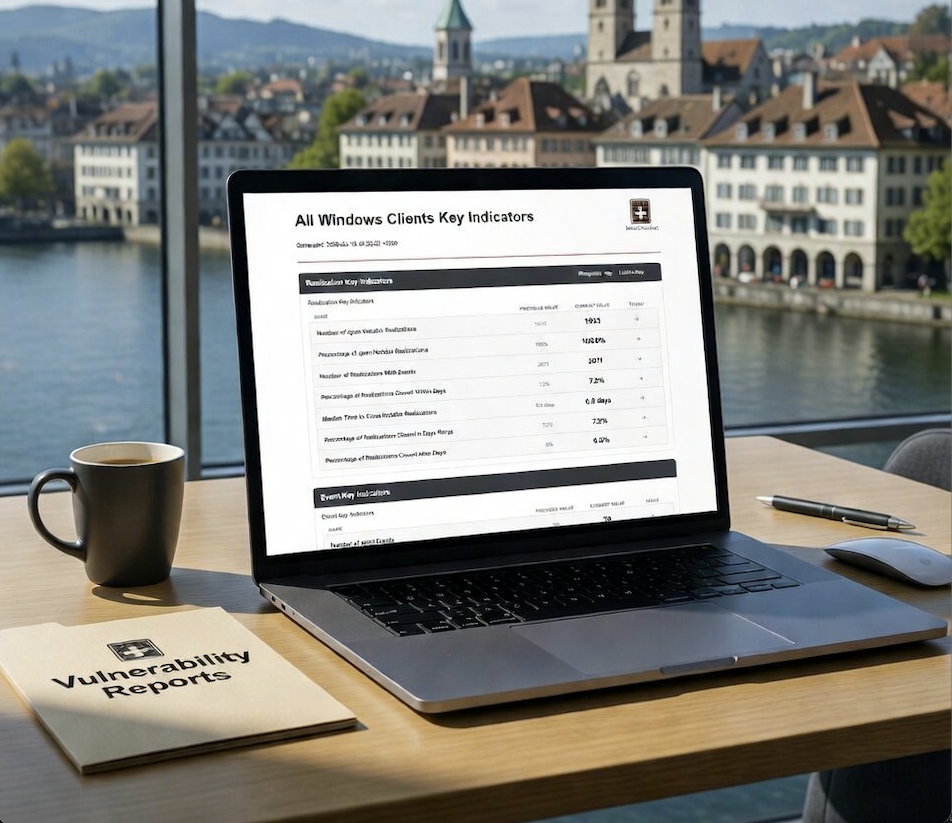
<p>This release brings targeted improvements for quicker manual workflows, more customizable notifications, expanded vulnerability data sources (including native Microsoft Defender support), enhanced deployment flexibility, and stronger remediation tracking within Vulnerability Intelligence</p>
<h2 class="anchor anchorTargetStickyNavbar_SAay" id="whats-new-in-380">What's New in 3.8.0<a href="https://alertmanager.app/blog/alert-manager-enterprise-3-8-0-released#whats-new-in-380" class="hash-link" aria-label="Direct link to What's New in 3.8.0" title="Direct link to What's New in 3.8.0" translate="no">​</a></h2>
<ul>
<li class="">
<p><strong>Custom email subject templating</strong><br>
<!-- -->Override default email subjects using full AME templating support. Craft precise, context-rich subjects that improve open rates and clarity for recipients.</p>
</li>
<li class="">
<p><strong>Template selection for manual event creation</strong><br>
<!-- -->When creating events manually, select any template to automatically apply field population, observable extraction, and other template logic - dramatically reducing manual effort and ensuring consistency with automated detections.</p>
</li>
<li class="">
<p><strong>Microsoft Defender vulnerability ingestion</strong><br>
<!-- -->Native support for pulling vulnerability data from <strong>Microsoft Defender</strong> — expand your consolidated security view inside Splunk without extra connectors.</p>
</li>
<li class="">
<p><strong>Path-based reverse proxy compatibility</strong><br>
<!-- -->AME now works seamlessly when served under a sub-path (e.g., <code>https://your-splunk-domain/ame/</code>) for environments with reverse proxies, ingress controllers, or shared gateways.</p>
</li>
<li class="">
<p><strong>Expanded vulnerability reporting KPIs</strong><br>
<!-- -->New indicators to track remediation performance more precisely:</p>
<ul>
<li class="">Percentage of open Notable Realizations</li>
<li class="">Number of realizations tied to an event</li>
<li class="">Median time to close notable realizations</li>
<li class="">Percentage closed within a configurable day range</li>
<li class="">Percentage closed after a configurable threshold</li>
</ul>
</li>
</ul>
<h2 class="anchor anchorTargetStickyNavbar_SAay" id="upgrade-guidance">Upgrade Guidance<a href="https://alertmanager.app/blog/alert-manager-enterprise-3-8-0-released#upgrade-guidance" class="hash-link" aria-label="Direct link to Upgrade Guidance" title="Direct link to Upgrade Guidance" translate="no">​</a></h2>
<p>Before upgrading, <strong>always</strong> review the <a href="https://alertmanager.app/docs/ame-before-upgrading" target="_blank" rel="noopener noreferrer" class="">Before You Upgrade guide</a> to prevent issues.</p>
<p>Full details:</p>
<ul>
<li class=""><a href="https://alertmanager.app/docs/ame-whats-new" target="_blank" rel="noopener noreferrer" class="">What's New in 3.8</a></li>
<li class=""><a href="https://alertmanager.app/docs/ame-release-notes" target="_blank" rel="noopener noreferrer" class="">Release Notes</a></li>
</ul>
<p>Download AME 3.8.0 today from <a href="https://splunkbase.splunk.com/app/6730/" target="_blank" rel="noopener noreferrer" class="">Splunkbase</a>.</p>
<p>Questions or feedback? Reach out via Splunk Answers, the Splunk Usergroup Slack, or contact Datapunctum directly.</p>]]></content>
        <author>
            <name>Datapunctum</name>
            <uri>https://datapunctum.com</uri>
        </author>
        <category label="ame" term="ame"/>
        <category label="splunk" term="splunk"/>
        <category label="release" term="release"/>
        <category label="updates" term="updates"/>
    </entry>
    <entry>
        <title type="html"><![CDATA[Use Case: Data Ingestion Monitoring with AME]]></title>
        <id>https://alertmanager.app/blog/data-ingestion-monitoring-with-alert-manager-enterprise</id>
        <link href="https://alertmanager.app/blog/data-ingestion-monitoring-with-alert-manager-enterprise"/>
        <updated>2026-02-19T00:00:00.000Z</updated>
        <summary type="html"><![CDATA[Data ingestion failures often go unnoticed until it's too late. In this post, we share how a simple detection layer + Alert Manager Enterprise monitors ingestion health.]]></summary>
        <content type="html"><![CDATA[<p><img decoding="async" loading="lazy" alt="Data Ingestion Monitoring with Alert Manager Enterprise" src="https://alertmanager.app/assets/images/data-ingestion-e359156a17058b0afa590461cbfc9426.jpg" width="1104" height="928" class="img__Ss2"></p>
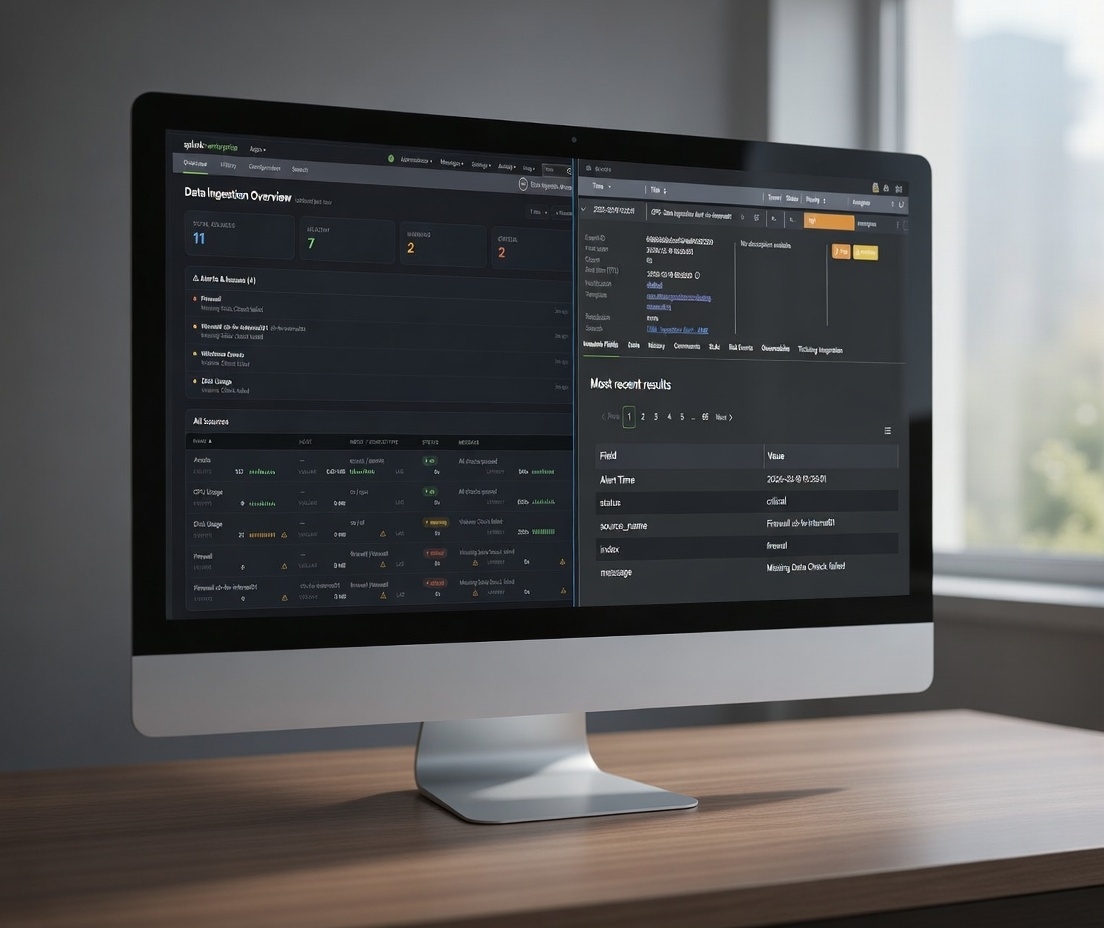
<p>Data ingestion failures often go unnoticed until it's too late. In this post, we share how a simple detection layer + Alert Manager Enterprise monitors ingestion health.</p>
<h2 class="anchor anchorTargetStickyNavbar_SAay" id="introduction">Introduction<a href="https://alertmanager.app/blog/data-ingestion-monitoring-with-alert-manager-enterprise#introduction" class="hash-link" aria-label="Direct link to Introduction" title="Direct link to Introduction" translate="no">​</a></h2>
<p>As a former consultant at heart working with Splunk environments, I have seen that data ingestion monitoring is becoming more and more important.</p>
<p>Customers build detections, dashboards, and reports, assuming that data will keep arriving once the forwarders and inputs are in place. Once everything is in place, nobody thinks about the fact that ingestion can quietly degrade (silent dropouts, latency increases, volume changes unexpectedly, or data completely blacking out).</p>
<p>Sometimes it can take hours, days, or longer before anyone notices. By then the impact is already downstream: stale dashboards, missed detections, audit findings, or worse.</p>
<p>The root causes fall into the following areas:</p>
<ul>
<li class="">Once the setup is complete, many teams assume the pipeline is self-monitoring</li>
<li class="">Splunk's Monitoring Console offers broad visibility, but rarely the granular, threshold-based per-source checks that catch real problems early</li>
<li class="">Adding more alerts feels risky in heavily loaded environments</li>
<li class="">Responsibility for end-to-end ingestion health is diffuse across ops, security, and analytics teams</li>
</ul>
<p>The result is eroded trust in the entire stack due to data gaps.</p>
<h2 class="anchor anchorTargetStickyNavbar_SAay" id="monitoring-data-ingestion">Monitoring Data Ingestion<a href="https://alertmanager.app/blog/data-ingestion-monitoring-with-alert-manager-enterprise#monitoring-data-ingestion" class="hash-link" aria-label="Direct link to Monitoring Data Ingestion" title="Direct link to Monitoring Data Ingestion" translate="no">​</a></h2>
<p>A couple of weeks ago one of the more popular ingestion monitoring apps in the Splunk ecosystem announced it would move away from its free license model entirely. That change leaves many customers in the lurch, as there's no immediate budget around.</p>
<p>That announcement made me think: what does a minimal ingestion monitoring setup actually require, and how much of the incident management and response side can be handled very effectively by Alert Manager Enterprise (AME), even with the free version of our app?</p>
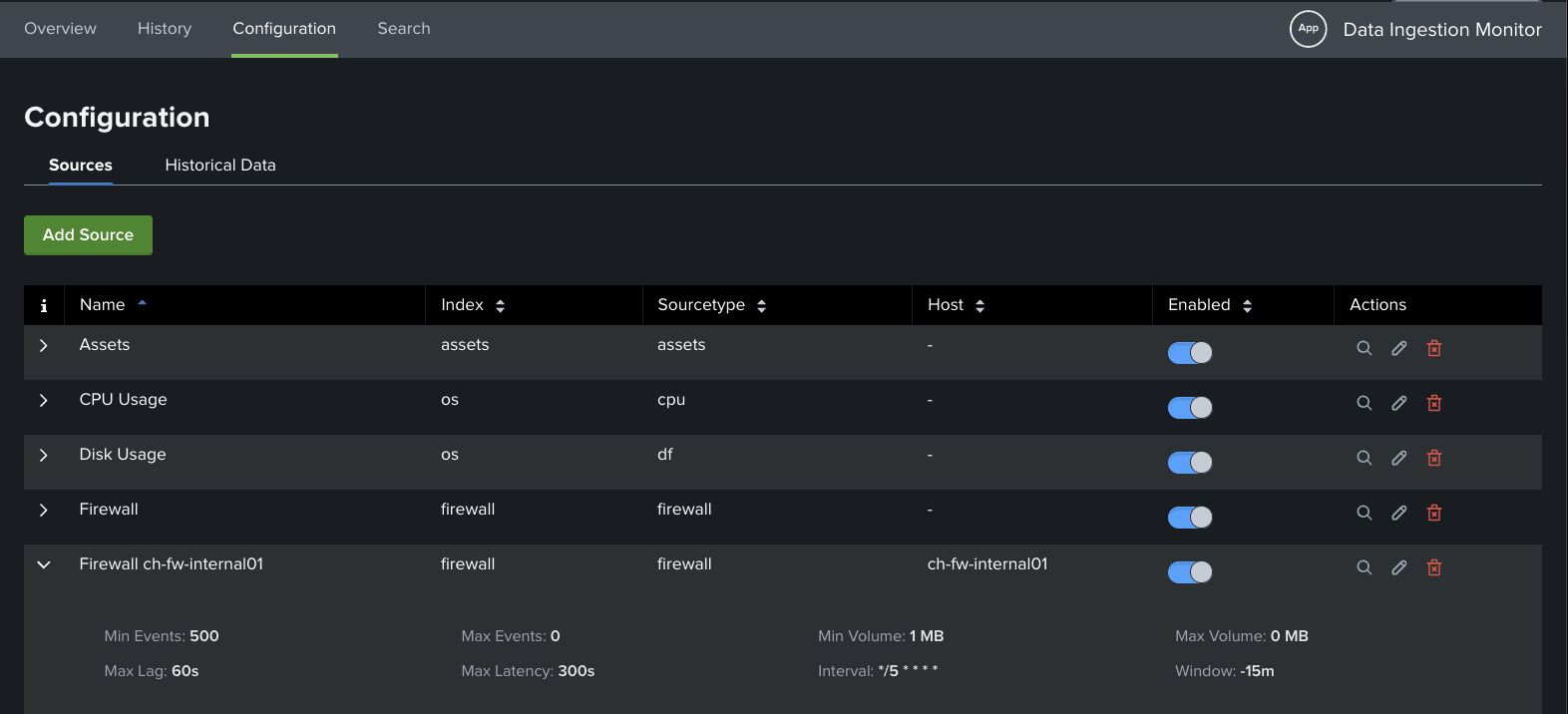
<p>I quickly put together a small proof-of-concept Splunk app called Data Ingestion Monitor (DIM), just to see what the core detection layer would look like.</p>
<p>My requirements for DIM were:</p>
<ul>
<li class="">Define the sources you care about (index + sourcetype, optional host filter)</li>
<li class="">Set basic per-source thresholds: min/max event count per window, min/max volume in MB, max indexing lag, max end-to-end latency</li>
<li class="">A handful of scheduled searches (bundled efficiently) compute the metrics and write current status to the KV Store</li>
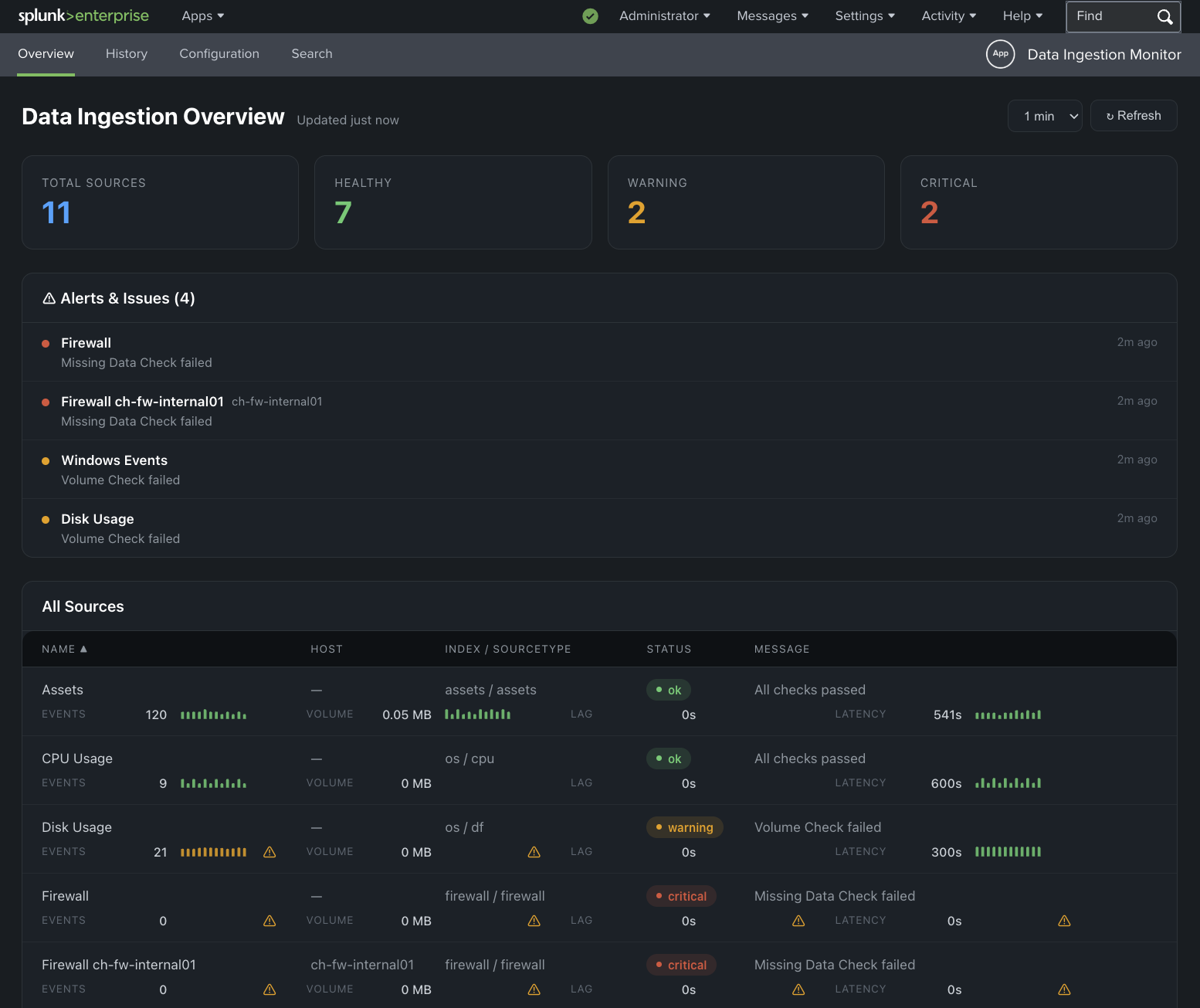
<li class="">A straightforward dashboard shows health summary cards, recent issues, and a source table with sparklines</li>
<li class="">Markers for failed checks (Missing Data, Volume issues, Lag too high, Latency too high, etc.)</li>
<li class="">Visualize historic data</li>
</ul>
<p>Nothing fancy. No ML, no external services, just native Splunk pieces.</p>
<p>The app answers the four most important questions:</p>
<ol>
<li class="">Is the source still sending data?</li>
<li class="">Are volumes roughly in the expected range?</li>
<li class="">Is indexing lag acceptable?</li>
<li class="">Is the latest data reasonably fresh?</li>
</ol>
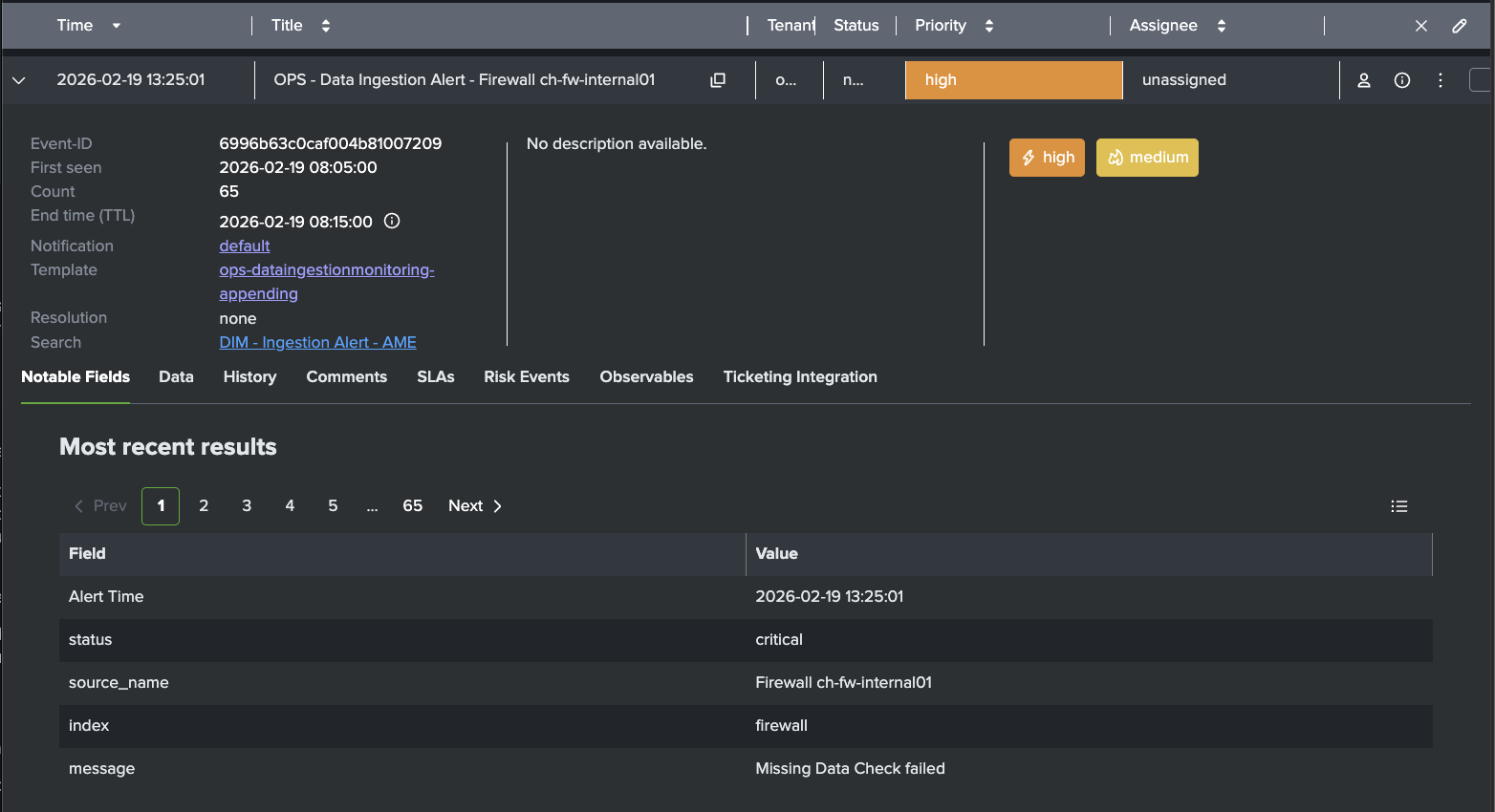
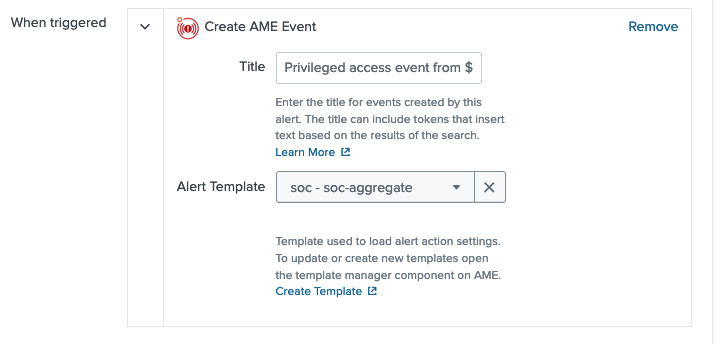
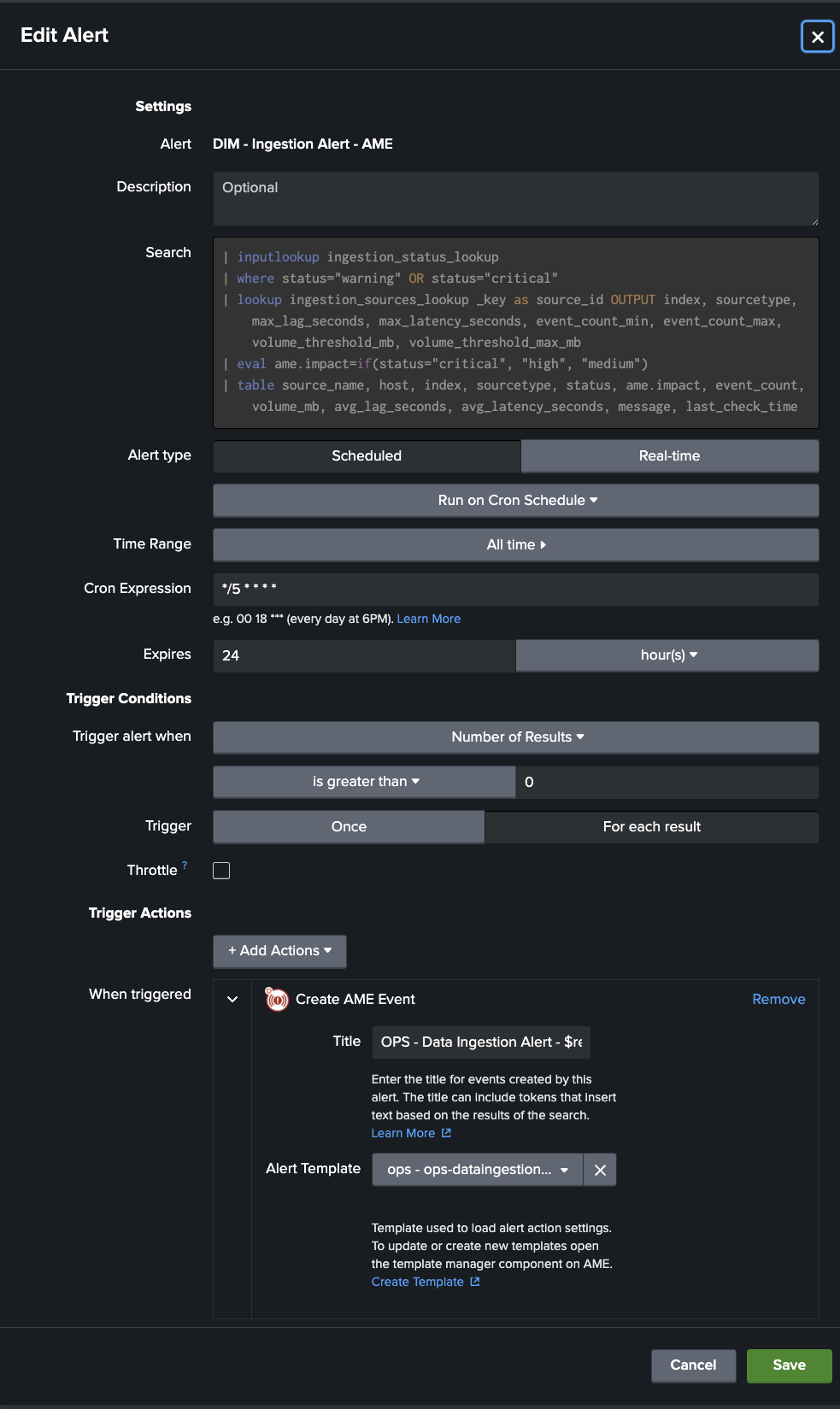
<p>With this, I was able to wire it up with Alert Manager Enterprise (AME). AME takes the detection of the DIM app from the lookup table and turns the results into actionable AME events.</p>
<p><img decoding="async" loading="lazy" alt="Data Ingestion Monitor Dashboard" src="https://alertmanager.app/assets/images/dim-dashboard-823d4022766193de6369c3bfc11f124d.png" width="1554" height="1305" class="img__Ss2">
<em>Data Ingestion Monitor - Proof-of-Concept</em></p>
<p><img decoding="async" loading="lazy" alt="Data Ingestion Monitor Configuration" src="https://alertmanager.app/assets/images/dim-config-b5aa0a6003df348d8636354fec7f6c66.png" width="1572" height="716" class="img__Ss2">
<em>Data Ingestion Monitor - Configuration Page</em></p>
<p><img decoding="async" loading="lazy" alt="DIM AME Integration" src="https://alertmanager.app/assets/images/dim-ame-integration-3998bb29b0bda360f4ccd7989fd109c7.png" width="983" height="1649" class="img__Ss2">
<em>DIM - AME Integration</em></p>
<h2 class="anchor anchorTargetStickyNavbar_SAay" id="templates--rules">Templates &amp; Rules<a href="https://alertmanager.app/blog/data-ingestion-monitoring-with-alert-manager-enterprise#templates--rules" class="hash-link" aria-label="Direct link to Templates &amp; Rules" title="Direct link to Templates &amp; Rules" translate="no">​</a></h2>
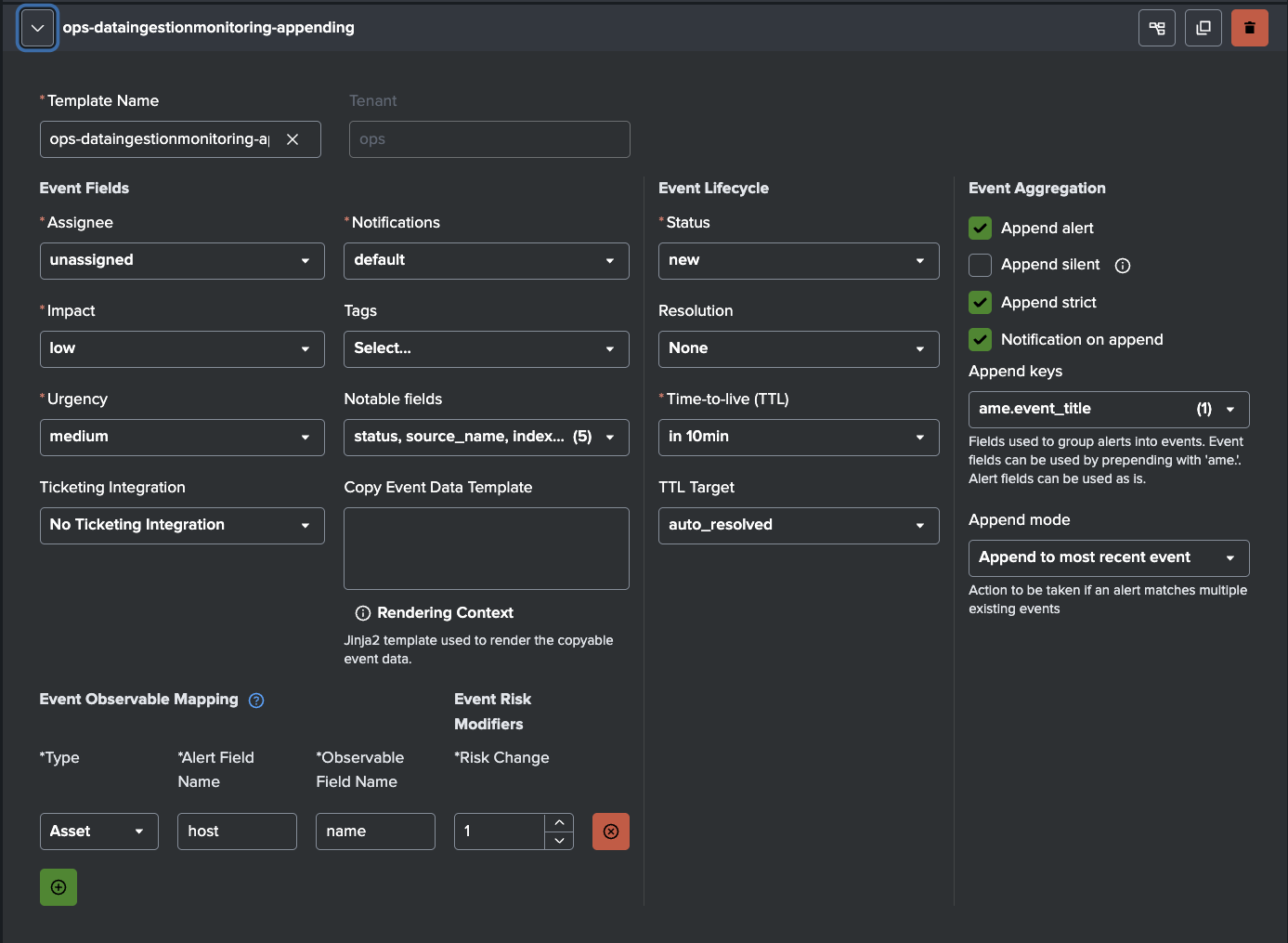
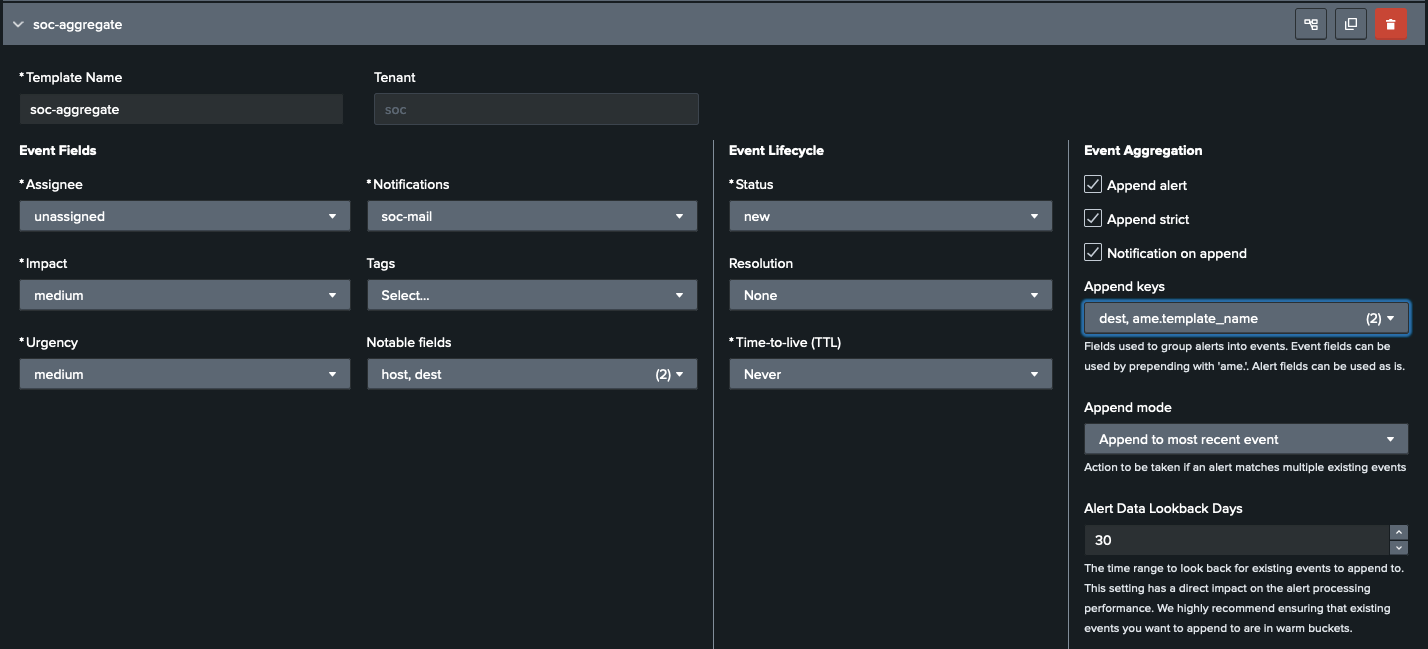
<p>Ingestion alerts can be noisy in predictable ways. On weekends there are quiet periods, repeating or planned maintenance windows, daily batch jobs during nights, or known low-activity sources during off-peak hours. With the help of AME's templates and Rules (cron-based or condition-based) noise can be reduced efficiently.</p>
<p>The following situations can be handled:</p>
<ul>
<li class="">Suppress or auto-close warnings that resolve themselves quickly (e.g. latency spike under 5 minutes)</li>
<li class="">Auto-assign based on source or index ("Windows Events" to ops, "Vulnerability Scan Results" to security, "Webserver" to application team)</li>
<li class="">Cron-based rules for maintenance windows: suppress all ingestion alerts from a specific set of sources (or entire indexes) between 02:00 and 04:00 every Saturday</li>
<li class="">Conditional rules: only suppress if the alert matches a particular host that you know is involved in scheduled maintenance activity</li>
</ul>
<p>After tuning templates and rules, most customers see a substantial drop in actionable events. Maintenance-related false positives can be avoided.</p>
<p><img decoding="async" loading="lazy" alt="AME Template for DIM Detections" src="https://alertmanager.app/assets/images/dim-template-33b09b195317531308a6e84c524c284b.png" width="1387" height="1015" class="img__Ss2">
<em>AME Template for DIM Detections</em></p>
<p><img decoding="async" loading="lazy" alt="AME Example Event for Missing Firewall Logs" src="https://alertmanager.app/assets/images/dim-example-event-7c020051b63768673444a025bbb46a38.png" width="1564" height="850" class="img__Ss2">
<em>AME Example Event for Missing Firewall Logs</em></p>
<h2 class="anchor anchorTargetStickyNavbar_SAay" id="slas">SLAs<a href="https://alertmanager.app/blog/data-ingestion-monitoring-with-alert-manager-enterprise#slas" class="hash-link" aria-label="Direct link to SLAs" title="Direct link to SLAs" translate="no">​</a></h2>
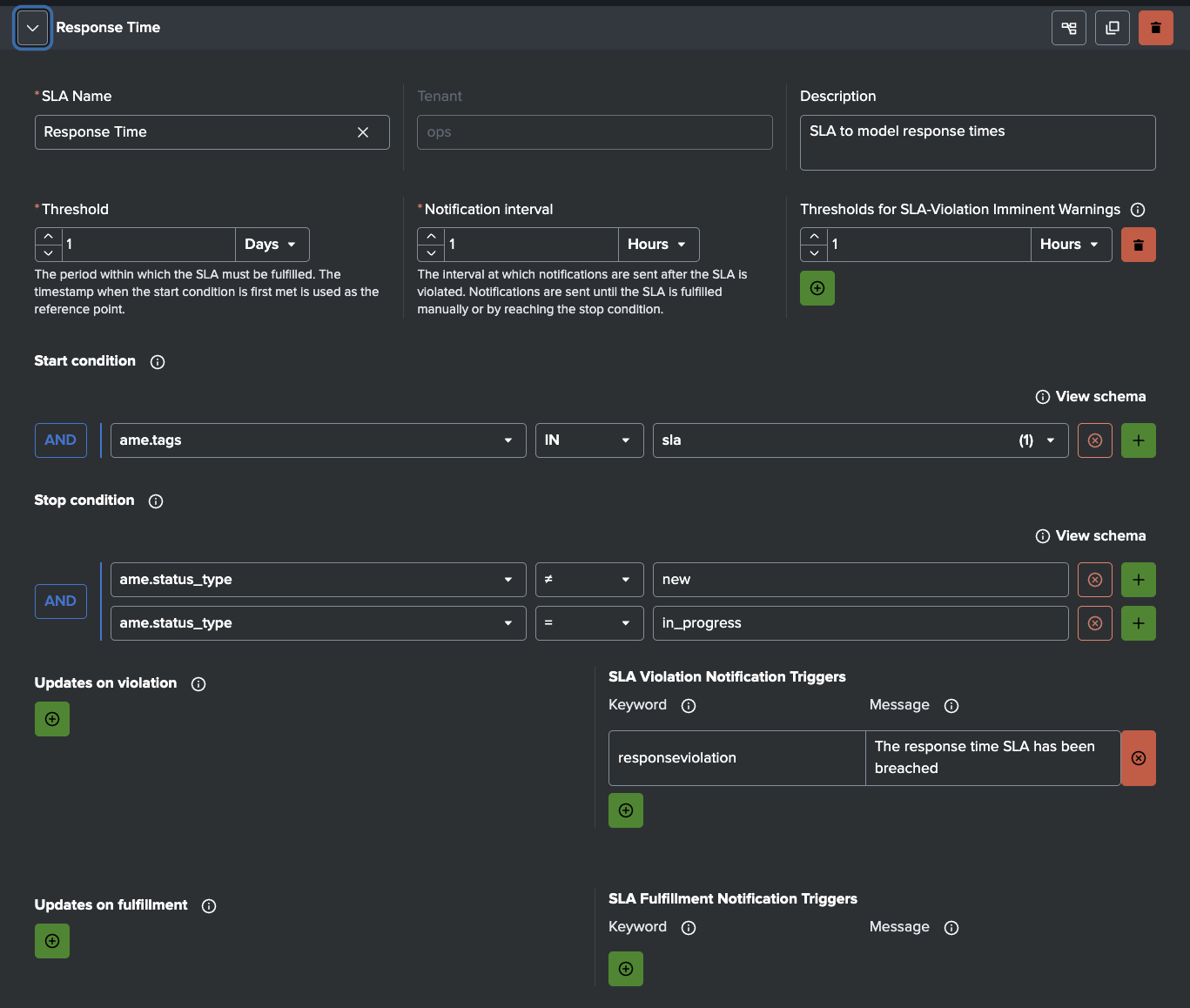
<p>Many ingestion issues are not solved in time because no hard limits exist. AME's Service Level Agreements attach enforceable deadlines to every event.</p>
<p>Examples:</p>
<ul>
<li class=""><strong>Critical alerts</strong> (missing data from security, firewall, identity, or compliance-critical sources): acknowledge in 15 minutes, resolve in 60 minutes</li>
<li class=""><strong>Warning-level issues</strong> (low volume on operational sources like disk, cpu, windows events): acknowledge in 30 minutes, resolve in 4 hours</li>
<li class=""><strong>High-business-impact sources</strong>: tighter SLAs (e.g. 10-minute ack)</li>
</ul>
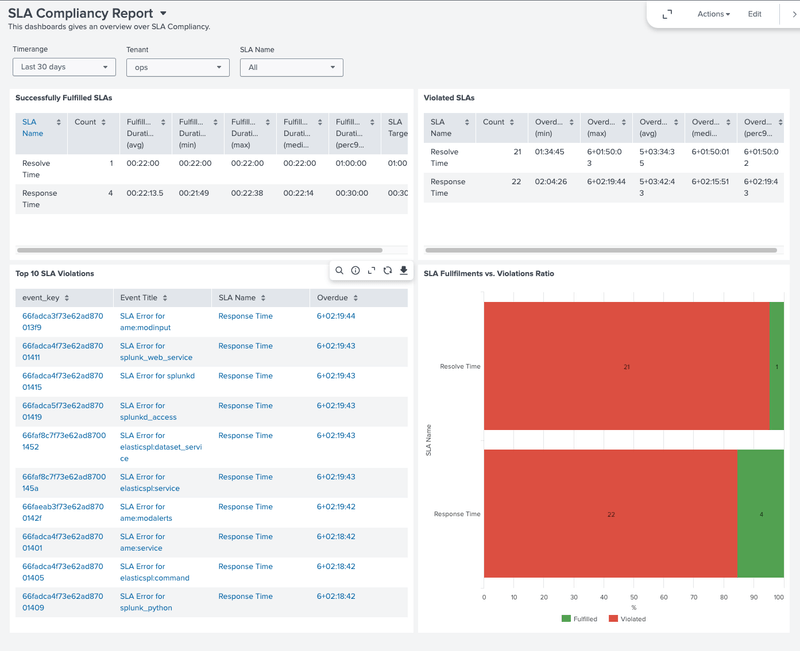
<p>AME tracks compliance automatically, escalates on breach, and gives auditable reporting. It turns ingestion health from "someone will look eventually" into a measurable commitment.</p>
<p><img decoding="async" loading="lazy" alt="AME Sample Response Time SLA" src="https://alertmanager.app/assets/images/dim-sla-01aa7096e60580a0f5e28e10ee4fc3e0.png" width="1367" height="1158" class="img__Ss2">
<em>AME - Sample Response Time SLA</em></p>
<h2 class="anchor anchorTargetStickyNavbar_SAay" id="notifications--integrations">Notifications &amp; Integrations<a href="https://alertmanager.app/blog/data-ingestion-monitoring-with-alert-manager-enterprise#notifications--integrations" class="hash-link" aria-label="Direct link to Notifications &amp; Integrations" title="Direct link to Notifications &amp; Integrations" translate="no">​</a></h2>
<p>AME supports Slack, Teams, email, webhooks, Jira, ServiceNow, and more. As DIM sends alerts that contain fields such as source_name, status, event_count, volume_mb, avg_lag_seconds, etc., notifications arrive with context.</p>
<p>Typical Notifications:</p>
<ul>
<li class=""><strong>Critical failure:</strong> instant Slack message to the on-call engineer</li>
<li class=""><strong>Warning:</strong> email to the team lead</li>
<li class=""><strong>SLA breach:</strong> automatic notification to the responsible manager</li>
</ul>
<p>When the problematic feed is not under your team's control (third-party vendors, other internal teams, cloud providers), AME's Jira and ServiceNow integrations are especially powerful. You can configure rules to automatically create a ticket in the upstream team's system, assign it to the right queue, pre-fill it with source name, index, failure details, metrics, and a link back to DIM or the AME event, and set the priority or the SLA based on criticality.</p>
<h2 class="anchor anchorTargetStickyNavbar_SAay" id="observables">Observables<a href="https://alertmanager.app/blog/data-ingestion-monitoring-with-alert-manager-enterprise#observables" class="hash-link" aria-label="Direct link to Observables" title="Direct link to Observables" translate="no">​</a></h2>
<p>AME's Observables let you attach structured asset/identity context to ingestion sources (e.g. owner_team, criticality, business_unit, asset ID).</p>
<p>When an alert arrives, AME matches fields (host, source_name, index) against observables and enriches the event automatically and can also increase the risk score for this asset.</p>
<p><img decoding="async" loading="lazy" alt="AME Observables" src="https://alertmanager.app/assets/images/dim-observables-76423c25c806c79bc21a55e9785e1dbe.png" width="1533" height="256" class="img__Ss2"></p>
<h2 class="anchor anchorTargetStickyNavbar_SAay" id="summary">Summary<a href="https://alertmanager.app/blog/data-ingestion-monitoring-with-alert-manager-enterprise#summary" class="hash-link" aria-label="Direct link to Summary" title="Direct link to Summary" translate="no">​</a></h2>
<p>In short: a minimal detection layer gives you early visibility into ingestion health. Alert Manager Enterprise takes it from there, keeping signal from noise. AME handles exceptions smartly (templates &amp; rules), enforces urgency (SLAs), applies real ownership (notifications &amp; integrations), and enriches events with context (observables). Ingestion problems get caught early, routed to the right people (or upstream teams), and most important, actually get resolved instead of quietly forgotten.</p>
<p>If ingestion monitoring has been more of an afterthought in your Splunk environment, or if a tool you relied on just changed its licensing and left you scrambling, you don't need to spin up a six-month custom monster. A lightweight detection setup (even just a few well-crafted scheduled searches) paired with AME can close the visibility gap in days and turn vague unease into measurable reliability.</p>
<h2 class="anchor anchorTargetStickyNavbar_SAay" id="learn-more">Learn More<a href="https://alertmanager.app/blog/data-ingestion-monitoring-with-alert-manager-enterprise#learn-more" class="hash-link" aria-label="Direct link to Learn More" title="Direct link to Learn More" translate="no">​</a></h2>
<p>Read our <a class="" href="https://alertmanager.app/docs/">docs</a> to learn how to install and configure AME.</p>
<p>Download AME from <a href="https://splunkbase.splunk.com/app/6730" target="_blank" rel="noopener noreferrer" class="">Splunkbase</a>.</p>
<p>Don't forget to check out our <a href="https://youtube.com/@datapunctum" target="_blank" rel="noopener noreferrer" class="">YouTube channel</a> for tutorial videos.</p>]]></content>
        <author>
            <name>Datapunctum</name>
            <uri>https://datapunctum.com</uri>
        </author>
        <category label="ame" term="ame"/>
        <category label="articles" term="articles"/>
        <category label="use-cases" term="use-cases"/>
        <category label="splunk" term="splunk"/>
    </entry>
    <entry>
        <title type="html"><![CDATA[AME Release: 3.7]]></title>
        <id>https://alertmanager.app/blog/alert-manager-enterprise-3-7-released</id>
        <link href="https://alertmanager.app/blog/alert-manager-enterprise-3-7-released"/>
        <updated>2026-02-05T00:00:00.000Z</updated>
        <summary type="html"><![CDATA[Introducing Alert Manager Enterprise Version 3.7: Smarter exports, clearer event visibility, and secure OAuth2 email support.]]></summary>
        <content type="html"><![CDATA[<p><img decoding="async" loading="lazy" alt="Alert Manager Enterprise 3.7" src="https://alertmanager.app/assets/images/ame-3-7-951a0ddd4830b9963e56d308d7451e82.png" width="1600" height="1363" class="img__Ss2"></p>
<p>Introducing Alert Manager Enterprise Version 3.7: Smarter exports, clearer event visibility, and secure OAuth2 email support.</p>
<p>Datapunctum has released version 3.7.0 of Alert Manager Enterprise (AME), continuing to enhance the leading Splunk-native platform for transforming raw alerts into structured, actionable incidents, all without leaving your Splunk environment.</p>
<p>This update focuses on practical usability improvements, better data handling, and expanded export capabilities that help teams work more efficiently with alerts and vulnerability intelligence.</p>
<h2 class="anchor anchorTargetStickyNavbar_SAay" id="whats-new-in-ame-370">What's New in AME 3.7.0<a href="https://alertmanager.app/blog/alert-manager-enterprise-3-7-released#whats-new-in-ame-370" class="hash-link" aria-label="Direct link to What's New in AME 3.7.0" title="Direct link to What's New in AME 3.7.0" translate="no">​</a></h2>
<h3 class="anchor anchorTargetStickyNavbar_SAay" id="new-features">New Features<a href="https://alertmanager.app/blog/alert-manager-enterprise-3-7-released#new-features" class="hash-link" aria-label="Direct link to New Features" title="Direct link to New Features" translate="no">​</a></h3>
<ul>
<li class=""><strong>Event Export from Event View</strong>: Export single or multiple events directly as CSV from the Event Overview for quick sharing or offline analysis.</li>
<li class=""><strong>Vulnerability Realization Export</strong>: Download filtered vulnerability realizations as CSV, making it easier to report on and track vulnerabilities.</li>
<li class=""><strong>Endtime for TTLs in Event Details</strong>: Events with a time-to-live (TTL) now clearly display their calculated end time in the details view.</li>
<li class=""><strong>New Vulnerability KPIs</strong>: Additional key performance indicators added to Vulnerability Intelligence scheduled reports for deeper insights.</li>
<li class=""><strong>Event Data Copy with Templating</strong>: Copy individual event fields or entire events to the clipboard using customizable templates, great for pasting into tickets, chats, or documentation.</li>
<li class=""><strong>OAuth2 Support for Mail Targets</strong>: Full OAuth2 authentication is now supported for email delivery targets, improving security and compatibility with modern email providers.</li>
</ul>
<p>AME remains a powerful choice for IT Ops and SOC teams who want to stay inside Splunk while gaining advanced alert aggregation, deduplication, status tracking, assignments, enrichment (MITRE ATT&amp;CK, risk scoring in higher tiers), and integrations with ServiceNow, Jira, Slack, Teams, and more.</p>
<p>The free core license is still available to get started, with premium features unlocked via subscription.</p>
<h2 class="anchor anchorTargetStickyNavbar_SAay" id="ready-to-upgrade">Ready to Upgrade?<a href="https://alertmanager.app/blog/alert-manager-enterprise-3-7-released#ready-to-upgrade" class="hash-link" aria-label="Direct link to Ready to Upgrade?" title="Direct link to Ready to Upgrade?" translate="no">​</a></h2>
<p>Download the latest version from Splunkbase: <a href="https://splunkbase.splunk.com/app/6730" target="_blank" rel="noopener noreferrer" class="">https://splunkbase.splunk.com/app/6730</a></p>
<p>Before upgrading, check the <a class="" href="https://alertmanager.app/docs/ame-before-upgrading">Before You Upgrade guide</a> to ensure a smooth transition.</p>
<p>Full details are in the official <a class="" href="https://alertmanager.app/docs/ame-whats-new">What's New section</a>.</p>]]></content>
        <author>
            <name>Datapunctum</name>
            <uri>https://datapunctum.com</uri>
        </author>
        <category label="ame" term="ame"/>
        <category label="updates" term="updates"/>
        <category label="releases" term="releases"/>
    </entry>
    <entry>
        <title type="html"><![CDATA[AME Release: 3.5]]></title>
        <id>https://alertmanager.app/blog/alert-manager-enterprise-3-5-released</id>
        <link href="https://alertmanager.app/blog/alert-manager-enterprise-3-5-released"/>
        <updated>2025-07-22T00:00:00.000Z</updated>
        <summary type="html"><![CDATA[Introducing Alert Manager Enterprise Version 3.5: Empowering Your Security Operations with Advanced Vulnerability Intelligence and Streamlined Workflows.]]></summary>
        <content type="html"><![CDATA[<p><img decoding="async" loading="lazy" alt="Alert Manager Enterprise 3.5" src="https://alertmanager.app/assets/images/ame-3-5-235e056c9bf7b6dfe36aa7a877208686.png" width="500" height="401" class="img__Ss2"></p>
<p>Introducing Alert Manager Enterprise Version 3.5: Empowering Your Security Operations with Advanced Vulnerability Intelligence and Streamlined Workflows.</p>
<p>We're thrilled to announce the release of Alert Manager Enterprise (AME) Version 3.5, our premium Splunk app designed to supercharge your incident management and security operations. This update brings key enhancements that help organizations identify vulnerabilities faster, automate responses, and maintain compliance.</p>
<h2 class="anchor anchorTargetStickyNavbar_SAay" id="revolutionizing-your-vulnerability-insights-with-vulnerability-intelligence">Revolutionizing Your Vulnerability Insights with Vulnerability Intelligence<a href="https://alertmanager.app/blog/alert-manager-enterprise-3-5-released#revolutionizing-your-vulnerability-insights-with-vulnerability-intelligence" class="hash-link" aria-label="Direct link to Revolutionizing Your Vulnerability Insights with Vulnerability Intelligence" title="Direct link to Revolutionizing Your Vulnerability Insights with Vulnerability Intelligence" translate="no">​</a></h2>
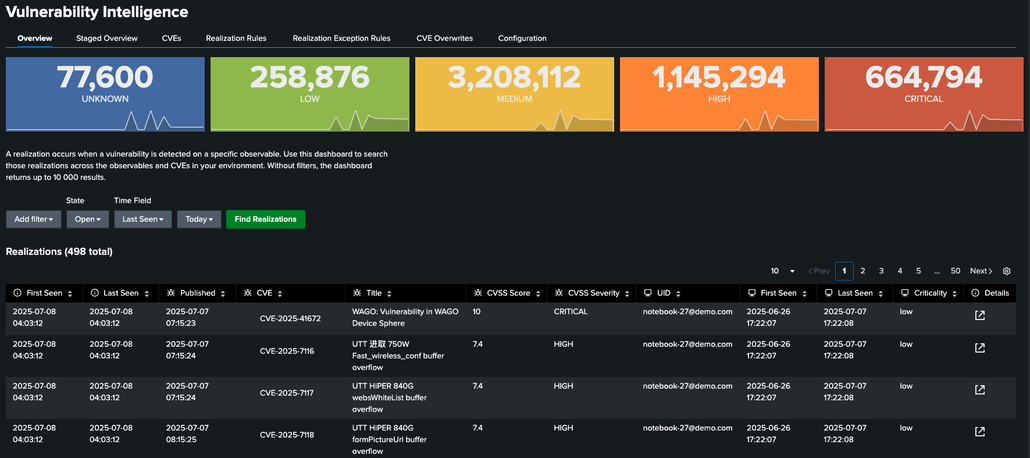
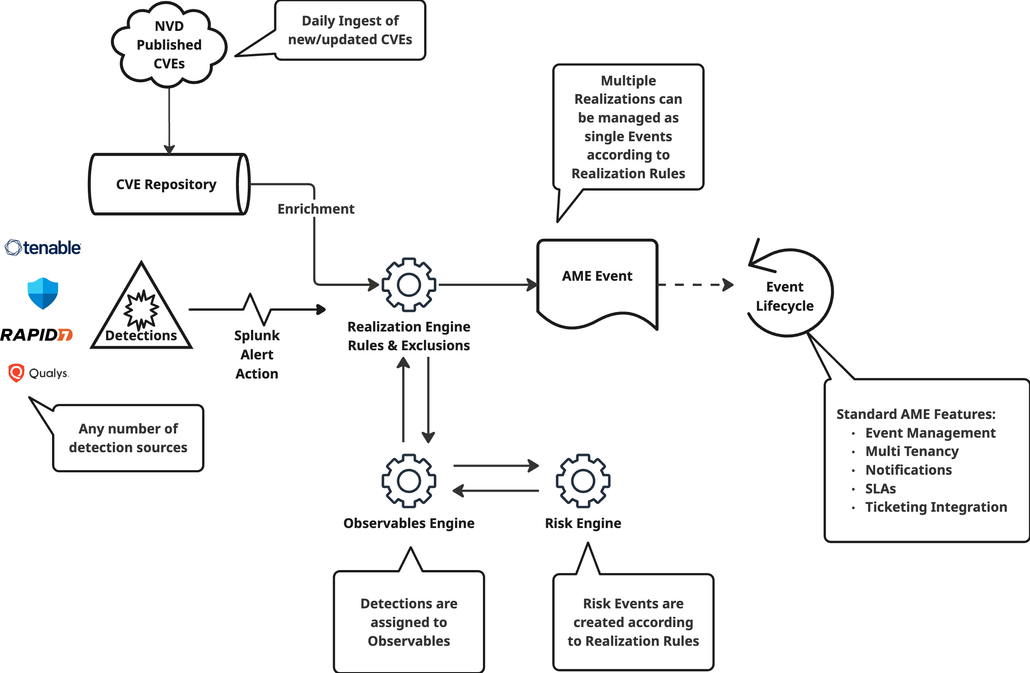
<p>At the core of AME 3.5 is our new Vulnerability Intelligence feature, a powerful tool for correlating vulnerabilities with asset intelligence, prioritizing exposures, and tracking remediation. Available with an AME Security Pack Subscription (contact sales for an evaluation license), it ingests data from diverse sources indexed in Splunk, using saved searches and the "Ingest Vulnerability Realizations" Alert Action to capture vulnerability realizations (live instances of known vulnerabilities on specific assets) and create AME Events based on realization rules.</p>
<p><img decoding="async" loading="lazy" alt="Vulnerability Intelligence Overview" src="https://alertmanager.app/assets/images/ame-3-5-vuln-overview-38c42ebe0b5e76cdf626d07bbc111091.png" width="1030" height="458" class="img__Ss2">
<em>Vulnerability Intelligence Overview</em></p>
<h3 class="anchor anchorTargetStickyNavbar_SAay" id="key-benefits-include">Key benefits include:<a href="https://alertmanager.app/blog/alert-manager-enterprise-3-5-released#key-benefits-include" class="hash-link" aria-label="Direct link to Key benefits include:" title="Direct link to Key benefits include:" translate="no">​</a></h3>
<ul>
<li class=""><strong>Lifecycle Tracking:</strong> Manage vulnerabilities from detection to resolution, including exclusions for accepted risks and periodic reviews for standards like PCI-DSS, ISO 27001, and NIST.</li>
<li class=""><strong>Staged Realizations:</strong> Identify issues on unknown assets to refine your observable inventory and reduce blind spots.</li>
<li class=""><strong>Customization Options:</strong> Tailor CVE metadata, set tenant-specific auto-resolve rules, and configure data retention.</li>
<li class=""><strong>Reporting Tools:</strong> Schedule customized reports with exactly the scope you need.</li>
</ul>
<p><img decoding="async" loading="lazy" alt="AME Vulnerability Intelligence Workflow" src="https://alertmanager.app/assets/images/ame-3-5-vuln-architecture-2f8992c30134c874271d52ac38e8617b.png" width="1030" height="673" class="img__Ss2">
<em>AME Vulnerability Intelligence Workflow Diagram</em></p>
<h2 class="anchor anchorTargetStickyNavbar_SAay" id="smarter-notifications-for-faster-responses">Smarter Notifications for Faster Responses<a href="https://alertmanager.app/blog/alert-manager-enterprise-3-5-released#smarter-notifications-for-faster-responses" class="hash-link" aria-label="Direct link to Smarter Notifications for Faster Responses" title="Direct link to Smarter Notifications for Faster Responses" translate="no">​</a></h2>
<p>We've enhanced notifications with greater flexibility and integration. The new "Create AME Notification Alert Action" enables triggering parametrized notifications from Splunk searches for timely alerts.</p>
<h2 class="anchor anchorTargetStickyNavbar_SAay" id="enhanced-observables-for-better-asset-visibility">Enhanced Observables for Better Asset Visibility<a href="https://alertmanager.app/blog/alert-manager-enterprise-3-5-released#enhanced-observables-for-better-asset-visibility" class="hash-link" aria-label="Direct link to Enhanced Observables for Better Asset Visibility" title="Direct link to Enhanced Observables for Better Asset Visibility" translate="no">​</a></h2>
<p>Observables in AME support Observable Reporting Groups, allowing nested organization based on attributes like region or network zones for hierarchical reporting. Use the "Ingest Observable Group" Alert Action to define groups from Splunk searches.</p>
<h2 class="anchor anchorTargetStickyNavbar_SAay" id="upgrade-to-ame-35-today-and-elevate-your-security-posture">Upgrade to AME 3.5 Today and Elevate Your Security Posture<a href="https://alertmanager.app/blog/alert-manager-enterprise-3-5-released#upgrade-to-ame-35-today-and-elevate-your-security-posture" class="hash-link" aria-label="Direct link to Upgrade to AME 3.5 Today and Elevate Your Security Posture" title="Direct link to Upgrade to AME 3.5 Today and Elevate Your Security Posture" translate="no">​</a></h2>
<p>AME Version 3.5 delivers proactive security with Vulnerability Intelligence, smarter notifications, and enhanced observables. Learn more about Alert Manager Enterprise at <a href="https://alertmanager.app/" target="_blank" rel="noopener noreferrer" class="">alertmanager.app</a>, download it on <a href="https://splunkbase.splunk.com/app/6730" target="_blank" rel="noopener noreferrer" class="">Splunkbase</a> or contact our sales team for details. At Datapunctum AG, we're committed to making Splunk work smarter for you.</p>
<p>Stay secure!</p>]]></content>
        <author>
            <name>Datapunctum</name>
            <uri>https://datapunctum.com</uri>
        </author>
        <category label="ame" term="ame"/>
        <category label="updates" term="updates"/>
        <category label="releases" term="releases"/>
    </entry>
    <entry>
        <title type="html"><![CDATA[AME Release: 3.4]]></title>
        <id>https://alertmanager.app/blog/alert-manager-enterprise-3-4-released</id>
        <link href="https://alertmanager.app/blog/alert-manager-enterprise-3-4-released"/>
        <updated>2025-05-08T00:00:00.000Z</updated>
        <summary type="html"><![CDATA[Alert Manager Enterprise 3.4 brings new improvements to event management, notifications, and overall stability.]]></summary>
        <content type="html"><![CDATA[<p><img decoding="async" loading="lazy" alt="Alert Manager Enterprise 3.4" src="https://alertmanager.app/assets/images/ame-3-4-a1263d853cfe29e773ed81b6d9c6f73b.png" width="1200" height="800" class="img__Ss2"></p>
<p>Alert Manager Enterprise 3.4 brings new improvements to event management, notifications, and overall stability.</p>
<p>We're excited to announce the release of Alert Manager Enterprise Version 3.4. This release continues our commitment to delivering the best alert management experience within Splunk.</p>
<h2 class="anchor anchorTargetStickyNavbar_SAay" id="highlights">Highlights<a href="https://alertmanager.app/blog/alert-manager-enterprise-3-4-released#highlights" class="hash-link" aria-label="Direct link to Highlights" title="Direct link to Highlights" translate="no">​</a></h2>
<ul>
<li class="">Improved event management workflows</li>
<li class="">Enhanced notification capabilities</li>
<li class="">Bug fixes and performance improvements</li>
</ul>
<h2 class="anchor anchorTargetStickyNavbar_SAay" id="download">Download<a href="https://alertmanager.app/blog/alert-manager-enterprise-3-4-released#download" class="hash-link" aria-label="Direct link to Download" title="Direct link to Download" translate="no">​</a></h2>
<p>Download the latest version from <a href="https://splunkbase.splunk.com/app/6730" target="_blank" rel="noopener noreferrer" class="">Splunkbase</a> and check the <a class="" href="https://alertmanager.app/docs/ame-release-notes">release notes</a> for full details.</p>]]></content>
        <author>
            <name>Datapunctum</name>
            <uri>https://datapunctum.com</uri>
        </author>
        <category label="ame" term="ame"/>
        <category label="updates" term="updates"/>
        <category label="releases" term="releases"/>
    </entry>
    <entry>
        <title type="html"><![CDATA[AME Release: 3.3]]></title>
        <id>https://alertmanager.app/blog/alert-manager-enterprise-3-3-released</id>
        <link href="https://alertmanager.app/blog/alert-manager-enterprise-3-3-released"/>
        <updated>2025-03-15T00:00:00.000Z</updated>
        <summary type="html"><![CDATA[Alert Manager Enterprise 3.3 introduces enhanced event aggregation and improved workflow capabilities.]]></summary>
        <content type="html"><![CDATA[<p><img decoding="async" loading="lazy" alt="Alert Manager Enterprise 3.3" src="https://alertmanager.app/assets/images/ame-3-3-ca312a5c167f98ba7457ad3d2609acd8.png" width="1423" height="1181" class="img__Ss2"></p>
<p>Alert Manager Enterprise 3.3 introduces Observables and Risk Scoring, two powerful new capabilities that bring context and prioritization to your incident management workflow.</p>
<p>Version 3.3 of Alert Manager Enterprise is now available on Splunkbase. This release focuses on enriching events with contextual information and helping teams prioritize effectively.</p>
<h2 class="anchor anchorTargetStickyNavbar_SAay" id="observables-context-at-your-fingertips">Observables: Context at Your Fingertips<a href="https://alertmanager.app/blog/alert-manager-enterprise-3-3-released#observables-context-at-your-fingertips" class="hash-link" aria-label="Direct link to Observables: Context at Your Fingertips" title="Direct link to Observables: Context at Your Fingertips" translate="no">​</a></h2>
<p>Observables allow you to attach structured contextual data, such as IP addresses, hostnames, user accounts, or file hashes, directly to your alert events. Instead of switching between tools, analysts can see all relevant artifacts in one place.</p>
<p><img decoding="async" loading="lazy" alt="Observables in Alert Manager Enterprise" src="https://alertmanager.app/assets/images/ame-3-3-observables-ca312a5c167f98ba7457ad3d2609acd8.png" width="1423" height="1181" class="img__Ss2"></p>
<p>Observables are automatically extracted from your alert data and can be enriched with additional lookups. This gives your team immediate access to the context they need to make faster decisions.</p>
<h3 class="anchor anchorTargetStickyNavbar_SAay" id="key-benefits">Key Benefits<a href="https://alertmanager.app/blog/alert-manager-enterprise-3-3-released#key-benefits" class="hash-link" aria-label="Direct link to Key Benefits" title="Direct link to Key Benefits" translate="no">​</a></h3>
<ul>
<li class=""><strong>Automatic extraction:</strong> Observables are parsed from event fields without manual configuration</li>
<li class=""><strong>Custom observable types:</strong> Define your own observable categories to match your use cases</li>
<li class=""><strong>Enrichment support:</strong> Extend observables with additional context from external sources</li>
<li class=""><strong>Drilldown actions:</strong> Click on any observable to pivot into deeper investigation</li>
</ul>
<h2 class="anchor anchorTargetStickyNavbar_SAay" id="risk-scoring-focus-on-what-matters">Risk Scoring: Focus on What Matters<a href="https://alertmanager.app/blog/alert-manager-enterprise-3-3-released#risk-scoring-focus-on-what-matters" class="hash-link" aria-label="Direct link to Risk Scoring: Focus on What Matters" title="Direct link to Risk Scoring: Focus on What Matters" translate="no">​</a></h2>
<p>With so many alerts competing for attention, knowing which events to prioritize is critical. AME 3.3 introduces a risk scoring framework that assigns a calculated priority to each event based on configurable criteria.</p>
<p><img decoding="async" loading="lazy" alt="Risk Scoring for events" src="https://alertmanager.app/assets/images/ame-3-3-risk-events-a82ab28701e56f74798eb3b9a91cb460.png" width="1030" height="129" class="img__Ss2"></p>
<p>Risk scores are computed using factors such as asset criticality, alert severity, historical patterns, and threat intelligence. Events with higher risk scores surface to the top of your queue, ensuring your team spends time on what truly matters.</p>
<h3 class="anchor anchorTargetStickyNavbar_SAay" id="how-it-works">How It Works<a href="https://alertmanager.app/blog/alert-manager-enterprise-3-3-released#how-it-works" class="hash-link" aria-label="Direct link to How It Works" title="Direct link to How It Works" translate="no">​</a></h3>
<ul>
<li class=""><strong>Configurable scoring rules:</strong> Define weights for different risk factors</li>
<li class=""><strong>Dynamic recalculation:</strong> Scores update as new information arrives</li>
<li class=""><strong>Visual indicators:</strong> See risk levels at a glance in the event list</li>
<li class=""><strong>Integration with workflows:</strong> Trigger automatic actions based on risk thresholds</li>
</ul>
<h2 class="anchor anchorTargetStickyNavbar_SAay" id="additional-improvements">Additional Improvements<a href="https://alertmanager.app/blog/alert-manager-enterprise-3-3-released#additional-improvements" class="hash-link" aria-label="Direct link to Additional Improvements" title="Direct link to Additional Improvements" translate="no">​</a></h2>
<ul>
<li class="">Enhanced event aggregation for reduced alert fatigue</li>
<li class="">Improved workflow action capabilities</li>
<li class="">Performance optimizations</li>
<li class="">Bug fixes and stability improvements</li>
</ul>
<h2 class="anchor anchorTargetStickyNavbar_SAay" id="get-started">Get Started<a href="https://alertmanager.app/blog/alert-manager-enterprise-3-3-released#get-started" class="hash-link" aria-label="Direct link to Get Started" title="Direct link to Get Started" translate="no">​</a></h2>
<p>Download the latest version from <a href="https://splunkbase.splunk.com/app/6730" target="_blank" rel="noopener noreferrer" class="">Splunkbase</a>.</p>]]></content>
        <author>
            <name>Datapunctum</name>
            <uri>https://datapunctum.com</uri>
        </author>
        <category label="ame" term="ame"/>
        <category label="updates" term="updates"/>
        <category label="releases" term="releases"/>
    </entry>
    <entry>
        <title type="html"><![CDATA[Feature Highlight: SLAs]]></title>
        <id>https://alertmanager.app/blog/exploring-sla-features-in-alert-manager-enterprise</id>
        <link href="https://alertmanager.app/blog/exploring-sla-features-in-alert-manager-enterprise"/>
        <updated>2025-02-05T00:00:00.000Z</updated>
        <summary type="html"><![CDATA[Explore the Service Levels feature introduced in AME 3.2, enabling precise control over event management with customizable SLAs.]]></summary>
        <content type="html"><![CDATA[<p><img decoding="async" loading="lazy" alt="Exploring SLA Features in Alert Manager Enterprise 3.2" src="https://alertmanager.app/assets/images/sla-features-062bb804b2a124732beb0c7e75c69ef0.png" width="800" height="651" class="img__Ss2"></p>
<p>In this article we wish to introduce users to the Service Levels features that were introduced with AME version 3.2. SLAs are a game-changing addition that empower you to define precise policies for managing service levels associated with events within AME.</p>
<h2 class="anchor anchorTargetStickyNavbar_SAay" id="what-are-slas-in-ame">What Are SLAs in AME?<a href="https://alertmanager.app/blog/exploring-sla-features-in-alert-manager-enterprise#what-are-slas-in-ame" class="hash-link" aria-label="Direct link to What Are SLAs in AME?" title="Direct link to What Are SLAs in AME?" translate="no">​</a></h2>
<p>SLAs enable fine-grained control over service levels, allowing you to specify objectives and thresholds for AME events. These agreements can be tailored to each tenant through the tenant configuration section, offering robust functionality to account for:</p>
<ul>
<li class="">Customer or Team Time Zones</li>
<li class="">Specific Working Hours and Days</li>
<li class="">Local and ad-hoc Holidays and Absences</li>
</ul>
<p>In AME, each SLA is governed by an objective, and multiple objectives can be configured per tenant to apply to specific event conditions.</p>
<h2 class="anchor anchorTargetStickyNavbar_SAay" id="defining-slas-a-step-by-step-guide">Defining SLAs: A Step-by-Step Guide<a href="https://alertmanager.app/blog/exploring-sla-features-in-alert-manager-enterprise#defining-slas-a-step-by-step-guide" class="hash-link" aria-label="Direct link to Defining SLAs: A Step-by-Step Guide" title="Direct link to Defining SLAs: A Step-by-Step Guide" translate="no">​</a></h2>
<h3 class="anchor anchorTargetStickyNavbar_SAay" id="example">Example<a href="https://alertmanager.app/blog/exploring-sla-features-in-alert-manager-enterprise#example" class="hash-link" aria-label="Direct link to Example" title="Direct link to Example" translate="no">​</a></h3>
<p>To illustrate, let's create an SLA for tracking <strong>Time to Respond</strong>. Start by assigning a name, such as "Response Time", and providing a description.</p>
<p>Define a threshold for after how long the SLA is considered violated. You can also configure a notification interval to alert teams until the SLA state is resolved. For example, set hourly notifications for ongoing violations. This will send a notification each hour until the SLA is no longer breached.</p>
<p>Additionally a reminder threshold can be set to warn teams before an SLA breach occurs.</p>
<h3 class="anchor anchorTargetStickyNavbar_SAay" id="establish-start-and-stop-conditions">Establish Start and Stop Conditions<a href="https://alertmanager.app/blog/exploring-sla-features-in-alert-manager-enterprise#establish-start-and-stop-conditions" class="hash-link" aria-label="Direct link to Establish Start and Stop Conditions" title="Direct link to Establish Start and Stop Conditions" translate="no">​</a></h3>
<p>The syntax used is similar to those of the AME rule engine to define when an SLA starts and stops.</p>
<ul>
<li class=""><strong>Start Condition:</strong> Check if an event title contains the keyword "SLA." (We only wish to match events with this keyword for SLA consideration)</li>
<li class=""><strong>Stop Condition:</strong> Ensure the SLA applies only to events in progress, excluding new events. For this we populate the <code>ame.status_type</code> and the conditionals appropriately.</li>
</ul>
<h3 class="anchor anchorTargetStickyNavbar_SAay" id="notifications">Notifications<a href="https://alertmanager.app/blog/exploring-sla-features-in-alert-manager-enterprise#notifications" class="hash-link" aria-label="Direct link to Notifications" title="Direct link to Notifications" translate="no">​</a></h3>
<p>Notifications for SLA violations or imminent breaches require defining a notification scheme. For this example we create a scheme named "SLA Violation" and link it to our notification target, which is email. You can also use Slack, Teams, or any other notification mechanism supported by AME.</p>
<h3 class="anchor anchorTargetStickyNavbar_SAay" id="use-case-update-event-metadata">Use-Case: Update Event Metadata<a href="https://alertmanager.app/blog/exploring-sla-features-in-alert-manager-enterprise#use-case-update-event-metadata" class="hash-link" aria-label="Direct link to Use-Case: Update Event Metadata" title="Direct link to Use-Case: Update Event Metadata" translate="no">​</a></h3>
<p>You can also update event metadata to better manage SLA states, such as escalating urgency for breached SLA events. This ensures analysts can quickly identify high-priority issues, when evaluating events in AME according to urgency and priority.</p>
<h2 class="anchor anchorTargetStickyNavbar_SAay" id="multiple-slas-for-one-event">Multiple SLAs for One Event<a href="https://alertmanager.app/blog/exploring-sla-features-in-alert-manager-enterprise#multiple-slas-for-one-event" class="hash-link" aria-label="Direct link to Multiple SLAs for One Event" title="Direct link to Multiple SLAs for One Event" translate="no">​</a></h2>
<p>AME supports defining multiple SLAs for the same event. For example, you can track both <strong>Time to Respond (TTA)</strong> and <strong>Time to Resolve (TTR)</strong> by creating an additional objective with start and stop conditions.</p>
<h2 class="anchor anchorTargetStickyNavbar_SAay" id="sla-periods">SLA Periods<a href="https://alertmanager.app/blog/exploring-sla-features-in-alert-manager-enterprise#sla-periods" class="hash-link" aria-label="Direct link to SLA Periods" title="Direct link to SLA Periods" translate="no">​</a></h2>
<p>You can configure the SLA validity periods with great flexibility in the configuration screen. AME allows you to define which time zone is in effect, which recurring and non-recurring holidays apply, as well as specific working hours for your teams or customers. These settings ensure that SLA rules only apply during active working periods.</p>
<p>If you are an MSSP managing multiple customers (tenants), then you can model the SLA times for your customers, applying their respective time zones and working hours.</p>
<h2 class="anchor anchorTargetStickyNavbar_SAay" id="reporting-sla-performance">Reporting SLA Performance<a href="https://alertmanager.app/blog/exploring-sla-features-in-alert-manager-enterprise#reporting-sla-performance" class="hash-link" aria-label="Direct link to Reporting SLA Performance" title="Direct link to Reporting SLA Performance" translate="no">​</a></h2>
<p>AME includes a dedicated reporting dashboard to monitor SLA metrics. Key insights include:</p>
<ul>
<li class="">SLA performance versus violations</li>
<li class="">Details broken down by tenant</li>
<li class="">Trends and analysis</li>
</ul>
<h2 class="anchor anchorTargetStickyNavbar_SAay" id="conclusion">Conclusion<a href="https://alertmanager.app/blog/exploring-sla-features-in-alert-manager-enterprise#conclusion" class="hash-link" aria-label="Direct link to Conclusion" title="Direct link to Conclusion" translate="no">​</a></h2>
<p>The SLA features in AME 3.2 provide unparalleled flexibility and control, enabling teams to meet service level expectations effectively. From response times to tailored working hours, these capabilities enhance your event management workflows.</p>
<p>For full configuration details, refer to the <a class="" href="https://alertmanager.app/docs/ame-slas">SLA documentation</a>.</p>
<h2 class="anchor anchorTargetStickyNavbar_SAay" id="tutorial-video">Tutorial Video<a href="https://alertmanager.app/blog/exploring-sla-features-in-alert-manager-enterprise#tutorial-video" class="hash-link" aria-label="Direct link to Tutorial Video" title="Direct link to Tutorial Video" translate="no">​</a></h2>
<p>Watch a step-by-step walkthrough of the SLA configuration on our <a href="https://www.youtube.com/@datapunctum" target="_blank" rel="noopener noreferrer" class="">YouTube channel</a>.</p>]]></content>
        <author>
            <name>Datapunctum</name>
            <uri>https://datapunctum.com</uri>
        </author>
        <category label="ame" term="ame"/>
        <category label="articles" term="articles"/>
    </entry>
    <entry>
        <title type="html"><![CDATA[Feature Highlight: Event Aggregation]]></title>
        <id>https://alertmanager.app/blog/enhanced-event-aggregation-in-alert-manager-enterprise-3-2</id>
        <link href="https://alertmanager.app/blog/enhanced-event-aggregation-in-alert-manager-enterprise-3-2"/>
        <updated>2025-01-20T00:00:00.000Z</updated>
        <summary type="html"><![CDATA[Learn about the enhanced event aggregation capabilities in Alert Manager Enterprise 3.2 that help reduce alert fatigue.]]></summary>
        <content type="html"><![CDATA[<p><img decoding="async" loading="lazy" alt="Enhanced Event Aggregation" src="https://alertmanager.app/assets/images/event-aggregation-2f4077331bb8577061793991906c0949.png" width="1428" height="649" class="img__Ss2"></p>
<p>Learn about the enhanced event aggregation capabilities in Alert Manager Enterprise 3.2 that help reduce alert fatigue.</p>
<p>Alert fatigue is one of the biggest challenges for IT Operations and Security teams. When your monitoring infrastructure generates thousands of alerts daily, it becomes impossible to identify which ones truly matter.</p>
<h2 class="anchor anchorTargetStickyNavbar_SAay" id="the-problem">The Problem<a href="https://alertmanager.app/blog/enhanced-event-aggregation-in-alert-manager-enterprise-3-2#the-problem" class="hash-link" aria-label="Direct link to The Problem" title="Direct link to The Problem" translate="no">​</a></h2>
<ul>
<li class="">Too many alerts from the same source</li>
<li class="">Duplicate notifications for recurring issues</li>
<li class="">Valuable time spent on non-actionable noise</li>
</ul>
<h2 class="anchor anchorTargetStickyNavbar_SAay" id="how-ame-32-helps">How AME 3.2 Helps<a href="https://alertmanager.app/blog/enhanced-event-aggregation-in-alert-manager-enterprise-3-2#how-ame-32-helps" class="hash-link" aria-label="Direct link to How AME 3.2 Helps" title="Direct link to How AME 3.2 Helps" translate="no">​</a></h2>
<p>Alert Manager Enterprise 3.2 introduces enhanced event aggregation that intelligently groups related alerts:</p>
<ul>
<li class=""><strong>Smart Grouping:</strong> Automatically group alerts based on configurable criteria</li>
<li class=""><strong>Deduplication:</strong> Prevent duplicate events from flooding your queue</li>
<li class=""><strong>Correlation:</strong> Link related events for unified investigation</li>
</ul>
<h2 class="anchor anchorTargetStickyNavbar_SAay" id="configuring-event-aggregation">Configuring Event Aggregation<a href="https://alertmanager.app/blog/enhanced-event-aggregation-in-alert-manager-enterprise-3-2#configuring-event-aggregation" class="hash-link" aria-label="Direct link to Configuring Event Aggregation" title="Direct link to Configuring Event Aggregation" translate="no">​</a></h2>
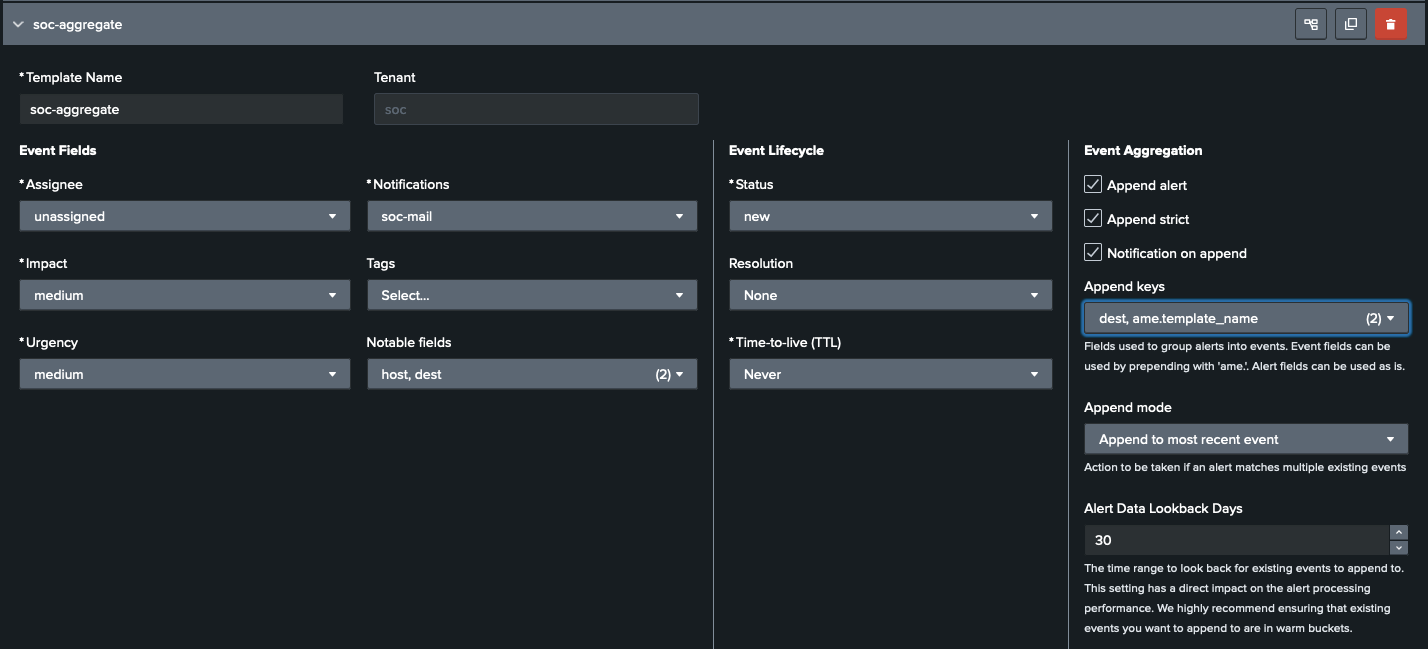
<p>Setting up event aggregation in AME is straightforward. From the Alert Manager settings, you can define aggregation templates that specify which fields to group by and how to handle incoming events.</p>
<p><img decoding="async" loading="lazy" alt="Aggregation template configuration" src="https://alertmanager.app/assets/images/agg-template-config-2f4077331bb8577061793991906c0949.png" width="1428" height="649" class="img__Ss2"></p>
<p>Templates support flexible field matching, you can aggregate by source, severity, category, or any combination of fields. Time windows let you control how long related events are grouped together.</p>
<h2 class="anchor anchorTargetStickyNavbar_SAay" id="example-use-case-aggregating-related-events">Example Use Case: Aggregating Related Events<a href="https://alertmanager.app/blog/enhanced-event-aggregation-in-alert-manager-enterprise-3-2#example-use-case-aggregating-related-events" class="hash-link" aria-label="Direct link to Example Use Case: Aggregating Related Events" title="Direct link to Example Use Case: Aggregating Related Events" translate="no">​</a></h2>
<p>Consider a scenario where a failing server generates hundreds of alerts across multiple monitoring checks. Without aggregation, your team is overwhelmed with individual notifications.</p>
<p><img decoding="async" loading="lazy" alt="Aggregation use case: before" src="https://alertmanager.app/assets/images/agg-use-case-1-2adcc236744caa0fe9d99c0ff0d8cc7f.png" width="715" height="344" class="img__Ss2"></p>
<p>With AME's event aggregation, all alerts from the same source within a configurable time window are automatically grouped into a single incident. Your team sees one actionable event instead of hundreds of repetitive alerts.</p>
<p><img decoding="async" loading="lazy" alt="Aggregation use case: grouped events" src="https://alertmanager.app/assets/images/agg-use-case-2-62928bd490c25c7d9ec39da2fec3c8aa.png" width="703" height="333" class="img__Ss2"></p>
<p>Each aggregated event retains links to all the underlying alerts, so analysts can drill down when needed, but the initial triage is dramatically simplified.</p>
<h2 class="anchor anchorTargetStickyNavbar_SAay" id="results">Results<a href="https://alertmanager.app/blog/enhanced-event-aggregation-in-alert-manager-enterprise-3-2#results" class="hash-link" aria-label="Direct link to Results" title="Direct link to Results" translate="no">​</a></h2>
<p>After enabling event aggregation, teams typically see a significant reduction in alert noise. The aggregated view makes it easy to identify the root cause and take action quickly.</p>
<p><img decoding="async" loading="lazy" alt="Aggregation results dashboard" src="https://alertmanager.app/assets/images/agg-results-ee451f6c192e0427d7bee27b76862de4.png" width="1649" height="482" class="img__Ss2"></p>
<p>Organizations using AME event aggregation report:</p>
<ul>
<li class=""><strong>70-90% reduction</strong> in alert volume</li>
<li class=""><strong>Faster MTTR</strong> due to grouped context</li>
<li class=""><strong>Improved analyst satisfaction</strong> with fewer repetitive tasks</li>
</ul>
<h2 class="anchor anchorTargetStickyNavbar_SAay" id="getting-started">Getting Started<a href="https://alertmanager.app/blog/enhanced-event-aggregation-in-alert-manager-enterprise-3-2#getting-started" class="hash-link" aria-label="Direct link to Getting Started" title="Direct link to Getting Started" translate="no">​</a></h2>
<p>Upgrade to AME 3.2 or later from <a href="https://splunkbase.splunk.com/app/6730" target="_blank" rel="noopener noreferrer" class="">Splunkbase</a> to take advantage of these features.</p>]]></content>
        <author>
            <name>Datapunctum</name>
            <uri>https://datapunctum.com</uri>
        </author>
        <category label="ame" term="ame"/>
        <category label="articles" term="articles"/>
        <category label="features" term="features"/>
    </entry>
    <entry>
        <title type="html"><![CDATA[AME Release: 3.2]]></title>
        <id>https://alertmanager.app/blog/alert-manager-enterprise-3-2-released</id>
        <link href="https://alertmanager.app/blog/alert-manager-enterprise-3-2-released"/>
        <updated>2024-11-11T00:00:00.000Z</updated>
        <summary type="html"><![CDATA[Alert Manager Enterprise 3.2 introduces SLA management, enhanced event aggregation, improved filtering, MS-Teams PowerAutomate support, and more.]]></summary>
        <content type="html"><![CDATA[<p><img decoding="async" loading="lazy" alt="Alert Manager Enterprise 3.2 Released" src="https://alertmanager.app/assets/images/ame-3-2-3bdf3d431546219e4dd7d5a8c59cbab5.png" width="800" height="491" class="img__Ss2"></p>
<p>Our latest Alert Manager Enterprise release introduces a suite of powerful enhancements designed to streamline event management, improve data visibility, and refine control over workflows. From advanced SLA management to enhanced event aggregation, here's a breakdown of what's new.</p>
<h2 class="anchor anchorTargetStickyNavbar_SAay" id="event-service-level-agreements-slas">Event Service Level Agreements (SLAs)<a href="https://alertmanager.app/blog/alert-manager-enterprise-3-2-released#event-service-level-agreements-slas" class="hash-link" aria-label="Direct link to Event Service Level Agreements (SLAs)" title="Direct link to Event Service Level Agreements (SLAs)" translate="no">​</a></h2>
<p>Managing SLAs is critical to ensure events meet response time commitments. With the new Event SLA Management, you can set, monitor, and report on SLAs for specific events. This feature allows you to define key metrics such as response time, the duration between an event's occurrence and its acknowledgment, and resolution time, the period from acknowledgment to issue resolution.</p>
<p>To proactively manage potential breaches, the system can send notifications when an SLA is nearing its threshold or has been breached. These alerts can be configured to repeat at specified intervals until the issue is resolved, ensuring timely attention and adherence to service commitments.</p>
<h2 class="anchor anchorTargetStickyNavbar_SAay" id="event-summary-customization">Event Summary Customization<a href="https://alertmanager.app/blog/alert-manager-enterprise-3-2-released#event-summary-customization" class="hash-link" aria-label="Direct link to Event Summary Customization" title="Direct link to Event Summary Customization" translate="no">​</a></h2>
<p>Customizing your Event Summary view is now more intuitive. You can select and save specific columns, tailoring the interface to display only the information most relevant to your operations. This streamlined approach enables quicker access to essential details, enhancing efficiency in event management.</p>
<h2 class="anchor anchorTargetStickyNavbar_SAay" id="enhanced-event-aggregation">Enhanced Event Aggregation<a href="https://alertmanager.app/blog/alert-manager-enterprise-3-2-released#enhanced-event-aggregation" class="hash-link" aria-label="Direct link to Enhanced Event Aggregation" title="Direct link to Enhanced Event Aggregation" translate="no">​</a></h2>
<p>Grouping events based on common attributes has become more flexible. The latest Event Aggregation improvements introduce additional field options for grouping, making it easier to identify patterns and correlations across different event types. This enhancement facilitates more effective analysis and response strategies.</p>
<h2 class="anchor anchorTargetStickyNavbar_SAay" id="improved-event-selection">Improved Event Selection<a href="https://alertmanager.app/blog/alert-manager-enterprise-3-2-released#improved-event-selection" class="hash-link" aria-label="Direct link to Improved Event Selection" title="Direct link to Improved Event Selection" translate="no">​</a></h2>
<p>Managing multiple events is now less cumbersome with new selection features. "Select all" and "Select page" options allow for rapid bulk actions, improving efficiency in high-volume event scenarios. Additionally, selected rows are now highlighted, providing clear visual feedback and reducing the likelihood of errors during bulk operations.</p>
<h2 class="anchor anchorTargetStickyNavbar_SAay" id="enhanced-event-filtering">Enhanced Event Filtering<a href="https://alertmanager.app/blog/alert-manager-enterprise-3-2-released#enhanced-event-filtering" class="hash-link" aria-label="Direct link to Enhanced Event Filtering" title="Direct link to Enhanced Event Filtering" translate="no">​</a></h2>
<p>Filter management has been redesigned for easier access. With Event Filtering Improvements, users can choose to display filters directly on the page, as an alternative to the previous slide-out model. This update makes refining event searches faster, allowing for quicker identification of relevant events.</p>
<p>Additionally, we've introduced filters specifically for SLAs, enabling you to focus on events based on their SLA status, such as breached or approaching breach, to ensure timely interventions.</p>
<h2 class="anchor anchorTargetStickyNavbar_SAay" id="resolution-restrictions-by-status">Resolution Restrictions by Status<a href="https://alertmanager.app/blog/alert-manager-enterprise-3-2-released#resolution-restrictions-by-status" class="hash-link" aria-label="Direct link to Resolution Restrictions by Status" title="Direct link to Resolution Restrictions by Status" translate="no">​</a></h2>
<p>For added control over event lifecycles, Resolution Restrictions allow administrators to enforce specific resolutions based on event status. This ensures that certain statuses follow predetermined closure protocols, reducing error risks and enforcing consistency in event handling.</p>
<h2 class="anchor anchorTargetStickyNavbar_SAay" id="support-for-client-certificates">Support for Client Certificates<a href="https://alertmanager.app/blog/alert-manager-enterprise-3-2-released#support-for-client-certificates" class="hash-link" aria-label="Direct link to Support for Client Certificates" title="Direct link to Support for Client Certificates" translate="no">​</a></h2>
<p>For organizations prioritizing security, we've enabled Client Certificate support. If enabled in splunkd, you can now use client certificates, offering an extra layer of security and control over API access and event handling. This enhancement helps protect sensitive data and ensures that only authorized clients can interact with your system.</p>
<h2 class="anchor anchorTargetStickyNavbar_SAay" id="api-endpoint-for-event-retrieval">API Endpoint for Event Retrieval<a href="https://alertmanager.app/blog/alert-manager-enterprise-3-2-released#api-endpoint-for-event-retrieval" class="hash-link" aria-label="Direct link to API Endpoint for Event Retrieval" title="Direct link to API Endpoint for Event Retrieval" translate="no">​</a></h2>
<p>For those who prefer direct data access, we've introduced a new API Endpoint to retrieve events programmatically. Previously, accessing events required running a search query. This new endpoint streamlines the process, enabling seamless integration with other systems and enhancing automation possibilities, allowing for more efficient data management and analysis.</p>
<h2 class="anchor anchorTargetStickyNavbar_SAay" id="object-references-in-the-ui">Object References in the UI<a href="https://alertmanager.app/blog/alert-manager-enterprise-3-2-released#object-references-in-the-ui" class="hash-link" aria-label="Direct link to Object References in the UI" title="Direct link to Object References in the UI" translate="no">​</a></h2>
<p>To aid in troubleshooting, Object References are now visible within the UI, providing insights into interconnected objects and dependencies. This transparency simplifies problem identification and speeds up resolution, making it easier to understand the relationships between different components.</p>
<h2 class="anchor anchorTargetStickyNavbar_SAay" id="notification-testing-functionality">Notification Testing Functionality<a href="https://alertmanager.app/blog/alert-manager-enterprise-3-2-released#notification-testing-functionality" class="hash-link" aria-label="Direct link to Notification Testing Functionality" title="Direct link to Notification Testing Functionality" translate="no">​</a></h2>
<p>Testing notifications just got easier! With the new Notification Testing option, you can manually trigger notifications to ensure configurations are correct, minimizing the risk of missed alerts. This feature allows for proactive verification of notification settings, ensuring that critical alerts are delivered as intended.</p>
<h2 class="anchor anchorTargetStickyNavbar_SAay" id="ms-teams-notification-enhancement">MS-Teams Notification Enhancement<a href="https://alertmanager.app/blog/alert-manager-enterprise-3-2-released#ms-teams-notification-enhancement" class="hash-link" aria-label="Direct link to MS-Teams Notification Enhancement" title="Direct link to MS-Teams Notification Enhancement" translate="no">​</a></h2>
<p>For those using MS-Teams, we've updated the Teams Notification feature to support PowerAutomate. This update offers continuity for users of the now-deprecated connector, enhancing integration flexibility and ensuring that your notification workflows remain uninterrupted.</p>
<p>These updates provide greater flexibility, improved control, and enhanced performance in managing events. Explore these powerful new tools to make your event workflows more efficient and reliable.</p>
<p><strong>References:</strong></p>
<ul>
<li class=""><a class="" href="https://alertmanager.app/docs/ame-release-notes">Release Notes</a></li>
<li class=""><a class="" href="https://alertmanager.app/docs/ame-slas">Documentation</a></li>
<li class=""><a href="https://splunkbase.splunk.com/app/6730" target="_blank" rel="noopener noreferrer" class="">SplunkBase</a></li>
</ul>]]></content>
        <author>
            <name>Datapunctum</name>
            <uri>https://datapunctum.com</uri>
        </author>
        <category label="ame" term="ame"/>
        <category label="updates" term="updates"/>
        <category label="releases" term="releases"/>
    </entry>
    <entry>
        <title type="html"><![CDATA[Tutorial: Workflow Actions in AME]]></title>
        <id>https://alertmanager.app/blog/video-tutorial-setting-up-workflow-actions-in-ame</id>
        <link href="https://alertmanager.app/blog/video-tutorial-setting-up-workflow-actions-in-ame"/>
        <updated>2024-09-10T00:00:00.000Z</updated>
        <summary type="html"><![CDATA[Learn how to extend Alert Manager Enterprise with Splunk workflow actions to drill into event fields in external systems.]]></summary>
        <content type="html"><![CDATA[<p><img decoding="async" loading="lazy" alt="Video Tutorial: Setting up Workflow Actions in AME" src="https://alertmanager.app/assets/images/workflow-actions-ac125c3977c47c435a2a4b42efde606c.jpg" width="800" height="450" class="img__Ss2"></p>
<p>Workflow Actions are a powerful tool provided by the base Splunk platform that allows for interactions between events in Splunk and external systems. AME can be extended with these workflow actions, to allow analysts to click on events within AME and drill into key fields into an external system.</p>
<p>Everything about setting up workflow actions can be found in the <a href="https://docs.splunk.com/Documentation/Splunk/latest/Knowledge/CreateworkflowactionsinSplunkWeb" target="_blank" rel="noopener noreferrer" class="">Splunk Knowledge Manager manual</a>.</p>
<p>In short, workflow actions bridge fields in Splunk with external web-based resources. They can be used for a number of use cases:</p>
<ul>
<li class="">Look up data for an IP address in an external system</li>
<li class="">Return information for a device from the CMDB</li>
<li class="">Create an incident in an external ticketing system</li>
</ul>
<p>Workflow actions can also be used to trigger a search within Splunk, allowing you to further drill into information within the Splunk platform itself.</p>
<h2 class="anchor anchorTargetStickyNavbar_SAay" id="tutorial">Tutorial<a href="https://alertmanager.app/blog/video-tutorial-setting-up-workflow-actions-in-ame#tutorial" class="hash-link" aria-label="Direct link to Tutorial" title="Direct link to Tutorial" translate="no">​</a></h2>
<p>In today's tutorial we will show how workflow actions can be used to extend the AME interface. We will be demonstrating how to pivot to an external data source to obtain more information about a threat.</p>
<p>In our AME instance, we will drill into an inbound port scan event. We would like to know more about the specific <code>src_ip</code> that is associated with this detection and we would like to look up this IP address in a Threat Intelligence Platform.</p>
<p>It is pertinent to note that Workflow Actions operate predominantly on fields. In this example, we will be navigating to Workflow Actions under Field Settings and add a new Workflow Action.</p>
<p>For our example we will enable an integration with VirusTotal. Once the action has been saved, reload the event within AME.</p>
<p>This can also be used to pivot to your CMDB system to look up asset information, or to peruse change information in your change management system.</p>
<p>Watch the full video tutorial on our <a href="https://www.youtube.com/@datapunctum" target="_blank" rel="noopener noreferrer" class="">YouTube channel</a> to see the step-by-step walkthrough.</p>]]></content>
        <author>
            <name>Datapunctum</name>
            <uri>https://datapunctum.com</uri>
        </author>
        <category label="ame" term="ame"/>
        <category label="articles" term="articles"/>
        <category label="tutorials" term="tutorials"/>
    </entry>
    <entry>
        <title type="html"><![CDATA[AME Release: 3.1]]></title>
        <id>https://alertmanager.app/blog/alert-manager-enterprise-3-1-released</id>
        <link href="https://alertmanager.app/blog/alert-manager-enterprise-3-1-released"/>
        <updated>2024-08-10T00:00:00.000Z</updated>
        <summary type="html"><![CDATA[Alert Manager Enterprise 3.1 brings UI improvements, rule engine enhancements, Python 3.9 compatibility, and many quality-of-life features.]]></summary>
        <content type="html"><![CDATA[<p><img decoding="async" loading="lazy" alt="Alert Manager Enterprise 3.1 Released" src="https://alertmanager.app/assets/images/ame-3-1-d5ac3faece04c69e0edb2671fff210e9.png" width="800" height="450" class="img__Ss2"></p>
<p>The Datapunctum AG team is proud to announce the latest 3.1 release of our flagship product. Alert Manager Enterprise. This release marks another milestone in the journey of Alert Manager Enterprise; specifically this release is a collaborative effort based on features requested by the community and our customers.</p>
<p>This release introduces a number of new features, compatibility improvements, bug fixes as well as performance enhancements to Alert Manager Enterprise. We will cover these broadly under the following sections.</p>
<h2 class="anchor anchorTargetStickyNavbar_SAay" id="ui-improvements">UI Improvements<a href="https://alertmanager.app/blog/alert-manager-enterprise-3-1-released#ui-improvements" class="hash-link" aria-label="Direct link to UI Improvements" title="Direct link to UI Improvements" translate="no">​</a></h2>
<h3 class="anchor anchorTargetStickyNavbar_SAay" id="event-summary-timeline">Event Summary Timeline<a href="https://alertmanager.app/blog/alert-manager-enterprise-3-1-released#event-summary-timeline" class="hash-link" aria-label="Direct link to Event Summary Timeline" title="Direct link to Event Summary Timeline" translate="no">​</a></h3>
<p>The AME event overview page sports three major improvements in this release. The first is the ability to toggle the Event Summary Timeline. The timeline has an earliest and latest period corresponding to what the user has selected as part of the filter properties. The timeline corresponds with the number of events grouped by their respective priorities.</p>
<p>We believe the timeline UI enhancement will be a great advantage especially to our NOC and SOC customers, that monitor events on large format displays.</p>
<h3 class="anchor anchorTargetStickyNavbar_SAay" id="compact-and-expanded-mode">Compact and Expanded Mode<a href="https://alertmanager.app/blog/alert-manager-enterprise-3-1-released#compact-and-expanded-mode" class="hash-link" aria-label="Direct link to Compact and Expanded Mode" title="Direct link to Compact and Expanded Mode" translate="no">​</a></h3>
<p>The second major UI improvement in this release is the "expanded mode" view. We have been asked by users for ways to present more information and context of an event in the overview page.</p>
<p>When perusing the list of events it is often useful, at a glance, to see for instance a specific key value field information for the event in the overview screen. This allows users to highlight key properties of the event directly in the overview page, saving additional clicks.</p>
<p>The information that can be opted to display includes:</p>
<ul>
<li class="">Notable fields (key/value)</li>
<li class="">Event Tags</li>
<li class="">Event Metadata</li>
</ul>
<p>The display settings for the expanded view can be configured in the tenant configuration screen. We believe this will improve efficiency of teams when perusing the event overview screen, as pertinent information can now be highlighted to the user or analyst, without the need to drill into the event first.</p>
<h3 class="anchor anchorTargetStickyNavbar_SAay" id="updates-to-the-refresh-functionality">Updates to the Refresh Functionality<a href="https://alertmanager.app/blog/alert-manager-enterprise-3-1-released#updates-to-the-refresh-functionality" class="hash-link" aria-label="Direct link to Updates to the Refresh Functionality" title="Direct link to Updates to the Refresh Functionality" translate="no">​</a></h3>
<p>The third major UI enhancement is the behaviour of the refresh functionality on the overview screen. A common caveat in the previous release was the loss of focus when a refresh of the screen occurred. We have completely reworked the refresh functionality so that updates to the event list no longer shifts the analyst's focus away from the information they were investigating.</p>
<p>Additionally, the refresh information is now updated in the footer of the overview display, showing the specific state of the refresh timer. When an event is brought into focus by the user, the refresh is paused and the footer updated. This ensures that the user will not lose focus when interacting with events.</p>
<h3 class="anchor anchorTargetStickyNavbar_SAay" id="event-summary-tab-ordering">Event Summary Tab Ordering<a href="https://alertmanager.app/blog/alert-manager-enterprise-3-1-released#event-summary-tab-ordering" class="hash-link" aria-label="Direct link to Event Summary Tab Ordering" title="Direct link to Event Summary Tab Ordering" translate="no">​</a></h3>
<p>When perusing an event, the ordering of the event tabs can now be adjusted. This order is configured in the tenant configuration page.</p>
<h3 class="anchor anchorTargetStickyNavbar_SAay" id="event-summary-saved-filters">Event Summary Saved Filters<a href="https://alertmanager.app/blog/alert-manager-enterprise-3-1-released#event-summary-saved-filters" class="hash-link" aria-label="Direct link to Event Summary Saved Filters" title="Direct link to Event Summary Saved Filters" translate="no">​</a></h3>
<p>AME 3.1 now has the ability to save your preset filter conditions for re-use or for sharing with your team. Also a requested feature by our community, having the ability to save and share filters ensures your entire team is on the same page when handling alerts in your environment.</p>
<p>As an example, a filter can be made for all events that match the <code>pci-dss</code> tag. The PCI SOC team can all select this filter in their AME console to ensure the team is considering only the pertinent events they need for their day-to-day activities.</p>
<h3 class="anchor anchorTargetStickyNavbar_SAay" id="single-value-trendlines">Single Value Trendlines<a href="https://alertmanager.app/blog/alert-manager-enterprise-3-1-released#single-value-trendlines" class="hash-link" aria-label="Direct link to Single Value Trendlines" title="Direct link to Single Value Trendlines" translate="no">​</a></h3>
<p>Single values now have trendlines within their bounding frames, showing the trend of the specific priority over time.</p>
<h2 class="anchor anchorTargetStickyNavbar_SAay" id="rule-engine-improvements">Rule Engine Improvements<a href="https://alertmanager.app/blog/alert-manager-enterprise-3-1-released#rule-engine-improvements" class="hash-link" aria-label="Direct link to Rule Engine Improvements" title="Direct link to Rule Engine Improvements" translate="no">​</a></h2>
<h3 class="anchor anchorTargetStickyNavbar_SAay" id="rule-execution-on-event-update">Rule Execution on Event Update<a href="https://alertmanager.app/blog/alert-manager-enterprise-3-1-released#rule-execution-on-event-update" class="hash-link" aria-label="Direct link to Rule Execution on Event Update" title="Direct link to Rule Execution on Event Update" translate="no">​</a></h3>
<p>The rule-engine can now also fire in a case where an event is updated (such as an append). This allows the rule engine to be used for more complex logic, as an example, if an alert triggers again, and the alert is unassigned, then the alert can be prioritized or escalated appropriately.</p>
<p>Additionally the rule engine now also supports wildcard matches.</p>
<h2 class="anchor anchorTargetStickyNavbar_SAay" id="compatibility-improvements">Compatibility Improvements<a href="https://alertmanager.app/blog/alert-manager-enterprise-3-1-released#compatibility-improvements" class="hash-link" aria-label="Direct link to Compatibility Improvements" title="Direct link to Compatibility Improvements" translate="no">​</a></h2>
<p>AME 3.1 is now compatible with Python 3.9. This is especially important for our Splunk Cloud customers, where Python 3.9 is now the default interpreter in the Cloud Stack. We especially urge our Splunk Cloud customers to upgrade to AME 3.1 to ensure current and future compatibility with Splunk Cloud installs.</p>
<h2 class="anchor anchorTargetStickyNavbar_SAay" id="other-improvements">Other Improvements<a href="https://alertmanager.app/blog/alert-manager-enterprise-3-1-released#other-improvements" class="hash-link" aria-label="Direct link to Other Improvements" title="Direct link to Other Improvements" translate="no">​</a></h2>
<h3 class="anchor anchorTargetStickyNavbar_SAay" id="full-name-displayed-for-assignee">Full Name Displayed for Assignee<a href="https://alertmanager.app/blog/alert-manager-enterprise-3-1-released#full-name-displayed-for-assignee" class="hash-link" aria-label="Direct link to Full Name Displayed for Assignee" title="Direct link to Full Name Displayed for Assignee" translate="no">​</a></h3>
<p>The full name (according to information in Splunk for the user) is now displayed, instead of the username.</p>
<h3 class="anchor anchorTargetStickyNavbar_SAay" id="chips-for-impact-and-urgency">Chips for Impact and Urgency<a href="https://alertmanager.app/blog/alert-manager-enterprise-3-1-released#chips-for-impact-and-urgency" class="hash-link" aria-label="Direct link to Chips for Impact and Urgency" title="Direct link to Chips for Impact and Urgency" translate="no">​</a></h3>
<p>The impact and urgency labels are now coloured appropriately.</p>
<h3 class="anchor anchorTargetStickyNavbar_SAay" id="bulk-comments-on-events">Bulk Comments on Events<a href="https://alertmanager.app/blog/alert-manager-enterprise-3-1-released#bulk-comments-on-events" class="hash-link" aria-label="Direct link to Bulk Comments on Events" title="Direct link to Bulk Comments on Events" translate="no">​</a></h3>
<p>A comment can now be added to multiple events at once.</p>
<h3 class="anchor anchorTargetStickyNavbar_SAay" id="internal-ame-fields-for-notable-fields">Internal AME Fields for Notable Fields<a href="https://alertmanager.app/blog/alert-manager-enterprise-3-1-released#internal-ame-fields-for-notable-fields" class="hash-link" aria-label="Direct link to Internal AME Fields for Notable Fields" title="Direct link to Internal AME Fields for Notable Fields" translate="no">​</a></h3>
<p>These can also be manipulated in AME as per notable fields.</p>
<h3 class="anchor anchorTargetStickyNavbar_SAay" id="search-command-for-object-reference-lookup">Search Command for Object Reference Lookup<a href="https://alertmanager.app/blog/alert-manager-enterprise-3-1-released#search-command-for-object-reference-lookup" class="hash-link" aria-label="Direct link to Search Command for Object Reference Lookup" title="Direct link to Search Command for Object Reference Lookup" translate="no">​</a></h3>
<p>A new command is provided for users if they need to delve into the object references of their AME installation. Example:</p>
<div class="language-text codeBlockContainer_ZGJx theme-code-block" style="--prism-color:#393A34;--prism-background-color:#f6f8fa"><div class="codeBlockContent_kX1v"><pre tabindex="0" class="prism-code language-text codeBlock_TAPP thin-scrollbar" style="color:#393A34;background-color:#f6f8fa"><code class="codeBlockLines_AdAo"><span class="token-line" style="color:#393A34"><span class="token plain">| amelookupreferences type=notification tenant_uid=ops object_name=ops-mail</span><br></span></code></pre></div></div>
<p>More information on the command may be obtained on our <a href="https://docs.datapunctum.com/ame/ame-command-amelookupreferences/" target="_blank" rel="noopener noreferrer" class="">documentation page</a>.</p>
<h3 class="anchor anchorTargetStickyNavbar_SAay" id="manually-add-a-cve-tag">Manually Add a CVE Tag<a href="https://alertmanager.app/blog/alert-manager-enterprise-3-1-released#manually-add-a-cve-tag" class="hash-link" aria-label="Direct link to Manually Add a CVE Tag" title="Direct link to Manually Add a CVE Tag" translate="no">​</a></h3>
<p>Users can now add their own context as CVE tags.</p>
<h3 class="anchor anchorTargetStickyNavbar_SAay" id="search-description-markdown-support">Search Description Markdown Support<a href="https://alertmanager.app/blog/alert-manager-enterprise-3-1-released#search-description-markdown-support" class="hash-link" aria-label="Direct link to Search Description Markdown Support" title="Direct link to Search Description Markdown Support" translate="no">​</a></h3>
<p>Markdown syntax typed in search description fields is now supported, meaning the markdown content is rendered in the saved search description.</p>
<h2 class="anchor anchorTargetStickyNavbar_SAay" id="in-closing">In Closing<a href="https://alertmanager.app/blog/alert-manager-enterprise-3-1-released#in-closing" class="hash-link" aria-label="Direct link to In Closing" title="Direct link to In Closing" translate="no">​</a></h2>
<p>All of us here at Datapunctum AG would like to thank our customers, community and users for their continued support in making Alert Manager Enterprise great!</p>
<p>We are continually improving the product and looking for interesting use cases where AME can help customers manage their alert fatigue. If you are interested in a demo, feature request, or need more information on how AME can help solve your Splunk alerting needs, please do not hesitate to <a href="https://alertmanager.app/" target="_blank" rel="noopener noreferrer" class="">reach out to us</a>. Follow us on <a href="https://www.linkedin.com/company/datapunctum/" target="_blank" rel="noopener noreferrer" class="">LinkedIn</a>.</p>
<p><strong>References:</strong></p>
<ul>
<li class=""><a href="https://docs.datapunctum.com/ame/ame-whats-new" target="_blank" rel="noopener noreferrer" class="">What's New</a></li>
<li class=""><a href="https://splunkbase.splunk.com/app/6730" target="_blank" rel="noopener noreferrer" class="">SplunkBase</a></li>
</ul>]]></content>
        <author>
            <name>Datapunctum</name>
            <uri>https://datapunctum.com</uri>
        </author>
        <category label="ame" term="ame"/>
        <category label="updates" term="updates"/>
        <category label="releases" term="releases"/>
    </entry>
    <entry>
        <title type="html"><![CDATA[Feature Highlight: Rules and Notifications]]></title>
        <id>https://alertmanager.app/blog/ame-3-0-new-rule-engine-notification-functionality</id>
        <link href="https://alertmanager.app/blog/ame-3-0-new-rule-engine-notification-functionality"/>
        <updated>2024-04-15T00:00:00.000Z</updated>
        <summary type="html"><![CDATA[A deep dive into the new Rule Engine and Notification Engine introduced in Alert Manager Enterprise 3.0.]]></summary>
        <content type="html"><![CDATA[<p><img decoding="async" loading="lazy" alt="AME 3.0 Rule Engine &amp;amp; Notifications" src="https://alertmanager.app/assets/images/ame-3-0-rule-engine-9eea8e385771abf8bde4e33839e7a17a.png" width="800" height="450" class="img__Ss2"></p>
<p>In our recent communication regarding the launch of Alert Manager Enterprise (AME) version 3.0, we introduced various new features and enhancements, showcasing our commitment to delivering substantial value to our clients and users. We plan to delve deeper into these updates through a series of blog posts, elaborating on how these innovations not only bolster the capabilities of AME but also offer customization options to align with the specific processes of our clients.</p>
<p>A highlight of the AME 3.0 release is the introduction of the Rule Engine, a pivotal element within AME's framework that empowers users to create intricate workflows and automation. This engine is at the heart of AME 3.0, underpinning the core logic and facilitating seamless interaction flows within the software.</p>
<p>The Rule Engine plays a crucial role, being activated whenever an alert is dispatched to AME. It meticulously evaluates all incoming events, utilizing the capability to modify event metadata based on a series of complex conditions. Users can craft these conditions through the Rule Composer, employing sophisticated conditional logic (AND/OR/NOT) that operates on either the event data or its metadata.</p>
<p>Furthermore, the Rule Engine triggers notifications through any supported schemes (Email, Slack, Teams, etc.). With the ability to initiate generic Webhooks through GET and POST requests, AME can be extended to automate and trigger a wide range of functions in external systems based on specific event conditions.</p>
<h2 class="anchor anchorTargetStickyNavbar_SAay" id="example-1-tagging-of-events-related-to-pci-networks">Example 1: Tagging of Events Related to PCI Networks<a href="https://alertmanager.app/blog/ame-3-0-new-rule-engine-notification-functionality#example-1-tagging-of-events-related-to-pci-networks" class="hash-link" aria-label="Direct link to Example 1: Tagging of Events Related to PCI Networks" title="Direct link to Example 1: Tagging of Events Related to PCI Networks" translate="no">​</a></h2>
<p>Properly handling events based on the originating PCI zone is imperative in scenarios requiring PCI compliance. A simple rule can assign a tag to an event if it originates from or is destined to a PCI zone, utilizing source or destination IP addresses. This facilitates setting appropriate impact and urgency levels for events associated with the Cardholder Data Environment (CDE) network.</p>
<p>Again, we can use the same template to handle events applying to PCI and non-PCI assets, and the rule will tag the event appropriately where required.</p>
<h2 class="anchor anchorTargetStickyNavbar_SAay" id="example-2-privileged-access-management">Example 2: Privileged Access Management<a href="https://alertmanager.app/blog/ame-3-0-new-rule-engine-notification-functionality#example-2-privileged-access-management" class="hash-link" aria-label="Direct link to Example 2: Privileged Access Management" title="Direct link to Example 2: Privileged Access Management" translate="no">​</a></h2>
<p>Monitoring privileged access is a staple activity within Security Operations Centers (SOCs), ensuring that elevated access privileges are used responsibly and audibly. AME facilitates this through a template that delineates the creation of new events following a privileged logon, accommodating environments that utilize both Windows and Linux systems. This unified approach in AME streamlines the management of privilege access events.</p>
<p>Since our environment supports both Windows and Linux, we have a single AME template for the Privilege Access Event, which is invoked by two searches: one machine logs in on Windows and the other on Linux. They have the same template in AME as the target, triggering a notification and setting event attributes when a privileged logon event occurs.</p>
<h2 class="anchor anchorTargetStickyNavbar_SAay" id="introducing-customisable-notifications">Introducing Customisable Notifications<a href="https://alertmanager.app/blog/ame-3-0-new-rule-engine-notification-functionality#introducing-customisable-notifications" class="hash-link" aria-label="Direct link to Introducing Customisable Notifications" title="Direct link to Introducing Customisable Notifications" translate="no">​</a></h2>
<p>The notification functionality in Alert Manager Enterprise (AME) version 3.0 has been significantly enhanced to cater to both human recipients and automated systems. Integrating the Rule Engine and the new Notification Engine allows for sophisticated conditional evaluations, enabling precise control over the timing and content of notifications sent to teams or external systems.</p>
<p>Administrators can now define <strong>Notification Schemes</strong>, <strong>Notification Targets</strong>, and <strong>Notification Templates</strong> within AME. Notification Targets refer to the delivery endpoints, such as Email, Slack, Teams, etc. Additionally, the system supports Splunk Alert Actions and Webhook targets, enabling users to develop REST/HTTP-based integrations with customized payloads derived from event data using the Template system.</p>
<p>This advanced functionality transforms AME into a robust platform for orchestrating complex workflows and automation.</p>
<p>The AME Template system is compatible with the widely-used Jinja syntax, which facilitates dynamic formatting and populating template contents. Templates can be tailored for structured and unstructured text-based formats, including HTML, XML, JSON, and plain text, enhancing flexibility and utility across various application scenarios.</p>
<h2 class="anchor anchorTargetStickyNavbar_SAay" id="going-further-whats-next">Going Further: What's Next?<a href="https://alertmanager.app/blog/ame-3-0-new-rule-engine-notification-functionality#going-further-whats-next" class="hash-link" aria-label="Direct link to Going Further: What's Next?" title="Direct link to Going Further: What's Next?" translate="no">​</a></h2>
<p>The Rule Engine's capability to facilitate complex event management logic and the Notification Engine's automatic update triggers pave the way for extensive automation possibilities. By leveraging external services via Webhooks, AME's system can be expanded to automate many functionalities.</p>
<p>Further exploration of these capabilities and their potential applications will be the subject of a forthcoming blog post. Follow us on <a href="https://www.linkedin.com/company/datapunctum/" target="_blank" rel="noopener noreferrer" class="">LinkedIn</a> to stay up to date.</p>]]></content>
        <author>
            <name>Datapunctum</name>
            <uri>https://datapunctum.com</uri>
        </author>
        <category label="ame" term="ame"/>
        <category label="updates" term="updates"/>
        <category label="articles" term="articles"/>
    </entry>
    <entry>
        <title type="html"><![CDATA[AME Release: 3.0]]></title>
        <id>https://alertmanager.app/blog/alert-manager-enterprise-3-0-released</id>
        <link href="https://alertmanager.app/blog/alert-manager-enterprise-3-0-released"/>
        <updated>2024-03-28T00:00:00.000Z</updated>
        <summary type="html"><![CDATA[Alert Manager Enterprise 3.0 brings a powerful new Rule Engine, Notification templates, Event Resolutions, and significant performance improvements.]]></summary>
        <content type="html"><![CDATA[<p><img decoding="async" loading="lazy" alt="Alert Manager Enterprise 3.0 Released" src="https://alertmanager.app/assets/images/ame-3-0-d5ac3faece04c69e0edb2671fff210e9.png" width="800" height="450" class="img__Ss2"></p>
<p>The Datapunctum team is proud to release version 3.0 of Alert Manager Enterprise. This major release marks another milestone in the Alert Manager Enterprise journey that started more than three years ago. We are especially proud of this release since it coincides with Datapunctum's 5th birthday, another significant achievement and impetus for celebration for the team.</p>
<p>We are excited about the new features and functionalities introduced in the latest release and how these features can help customers realize how AME can benefit their event resolution workflows.</p>
<h2 class="anchor anchorTargetStickyNavbar_SAay" id="rule-and-notification-engines">Rule and Notification Engines<a href="https://alertmanager.app/blog/alert-manager-enterprise-3-0-released#rule-and-notification-engines" class="hash-link" aria-label="Direct link to Rule and Notification Engines" title="Direct link to Rule and Notification Engines" translate="no">​</a></h2>
<p>This release sees significant enhancements to the Rule and Notification engines within AME. Customers can now model workflows and states according to their processes. The release also introduces Notification templates and a template editor. Customers can craft custom templates with content based on the Jinja templating syntax to drive notifications from the platform.</p>
<h2 class="anchor anchorTargetStickyNavbar_SAay" id="event-automation">Event Automation<a href="https://alertmanager.app/blog/alert-manager-enterprise-3-0-released#event-automation" class="hash-link" aria-label="Direct link to Event Automation" title="Direct link to Event Automation" translate="no">​</a></h2>
<p>The rule engine can now be used to power dynamic event updates, using the rule composer to craft complex logic evaluations for when updates and notification triggers should fire.</p>
<h2 class="anchor anchorTargetStickyNavbar_SAay" id="event-resolutions">Event Resolutions<a href="https://alertmanager.app/blog/alert-manager-enterprise-3-0-released#event-resolutions" class="hash-link" aria-label="Direct link to Event Resolutions" title="Direct link to Event Resolutions" translate="no">​</a></h2>
<p>Event resolutions are now available, allowing analysts to set the ultimate state of an event, such as designating it as a "False positive," "True positive," "Benign true positive," etc. Customers can define their own resolutions per tenant to ensure that events are accurately classified and can provide insights into reporting KPIs.</p>
<h2 class="anchor anchorTargetStickyNavbar_SAay" id="improved-statuses">Improved Statuses<a href="https://alertmanager.app/blog/alert-manager-enterprise-3-0-released#improved-statuses" class="hash-link" aria-label="Direct link to Improved Statuses" title="Direct link to Improved Statuses" translate="no">​</a></h2>
<p>Statuses have been improved, and status transitions can now be enforced. Users can now constrain transitions to ensure that event flows accurately match their internal processes, ensuring that users can no longer transition events improperly.</p>
<h2 class="anchor anchorTargetStickyNavbar_SAay" id="performance-improvements">Performance Improvements<a href="https://alertmanager.app/blog/alert-manager-enterprise-3-0-released#performance-improvements" class="hash-link" aria-label="Direct link to Performance Improvements" title="Direct link to Performance Improvements" translate="no">​</a></h2>
<p>Overall, performance improvements were also made to the new release. The backend and API improvements result in a much more responsive user interface and overall user experience.</p>
<h2 class="anchor anchorTargetStickyNavbar_SAay" id="notification-template-editor">Notification Template Editor<a href="https://alertmanager.app/blog/alert-manager-enterprise-3-0-released#notification-template-editor" class="hash-link" aria-label="Direct link to Notification Template Editor" title="Direct link to Notification Template Editor" translate="no">​</a></h2>
<p>Customers can craft custom templates using the templating syntax to render structured text (such as HTML) or normal plain text. Event information and metadata can be freely referenced to create punctual and concise notifications, ensuring the right information is distributed to analysts at the right time.</p>
<p>We will be publishing additional blogs and articles showcasing how these new features can enable your team to streamline and improve their workflows and alert management processes.</p>
<p>We are proud of this latest achievement and eager for our customers to experience the benefits of Alert Manager Enterprise Version 3.0. Our commitment to continuous improvement and excellence remains unwavering, and we look forward to supporting our customers in achieving their operational goals. Stay tuned, and be sure to follow us on <a href="https://www.linkedin.com/company/datapunctum/" target="_blank" rel="noopener noreferrer" class="">LinkedIn</a>.</p>
<p><strong>References:</strong></p>
<ul>
<li class=""><a href="https://docs.datapunctum.com/ame/ame-release-notes" target="_blank" rel="noopener noreferrer" class="">Release Notes</a></li>
<li class=""><a href="https://docs.datapunctum.com/ame/ame-whats-new" target="_blank" rel="noopener noreferrer" class="">What's New</a></li>
<li class=""><a href="https://docs.datapunctum.com/ame" target="_blank" rel="noopener noreferrer" class="">Documentation</a></li>
<li class=""><a href="https://splunkbase.splunk.com/app/6730" target="_blank" rel="noopener noreferrer" class="">SplunkBase</a></li>
</ul>]]></content>
        <author>
            <name>Datapunctum</name>
            <uri>https://datapunctum.com</uri>
        </author>
        <category label="ame" term="ame"/>
        <category label="updates" term="updates"/>
        <category label="releases" term="releases"/>
    </entry>
    <entry>
        <title type="html"><![CDATA[Integration: Jira and Splunk Mobile]]></title>
        <id>https://alertmanager.app/blog/alert-manager-enterprise-jira-and-splunk-mobile-integration</id>
        <link href="https://alertmanager.app/blog/alert-manager-enterprise-jira-and-splunk-mobile-integration"/>
        <updated>2023-11-06T00:00:00.000Z</updated>
        <summary type="html"><![CDATA[How to integrate Alert Manager Enterprise with Jira and Splunk Mobile using Alert Action Notifications.]]></summary>
        <content type="html"><![CDATA[<p><img decoding="async" loading="lazy" alt="Jira and Splunk Mobile Integration" src="https://alertmanager.app/assets/images/jira-splunk-mobile-9d5324b193d404ff0d1d370a3999d831.png" width="535" height="477" class="img__Ss2"></p>
<p>Alert Manager Enterprise 2.0 was released last week, bringing many exciting new features. In Version 2.0, we also changed the Alert Action Notifications into a free feature.</p>
<h2 class="anchor anchorTargetStickyNavbar_SAay" id="the-power-of-alert-action-notifications">The Power of Alert Action Notifications<a href="https://alertmanager.app/blog/alert-manager-enterprise-jira-and-splunk-mobile-integration#the-power-of-alert-action-notifications" class="hash-link" aria-label="Direct link to The Power of Alert Action Notifications" title="Direct link to The Power of Alert Action Notifications" translate="no">​</a></h2>
<p>The Alert Action Notification feature allows you to utilize existing Alert Actions seamlessly. This means that the results of an AME event can now be effortlessly passed to the selected Alert Action command when a status change happens, e.g., when a new Event is created or assigned.</p>
<p>The Alert Action Channel supports parametrization. You can use static values for parameters or reference results using the <code>$&lt;result.field&gt;$</code> syntax. This flexibility gives you full control and customization over your alerts.</p>
<h2 class="anchor anchorTargetStickyNavbar_SAay" id="real-world-examples">Real-World Examples<a href="https://alertmanager.app/blog/alert-manager-enterprise-jira-and-splunk-mobile-integration#real-world-examples" class="hash-link" aria-label="Direct link to Real-World Examples" title="Direct link to Real-World Examples" translate="no">​</a></h2>
<p>To show you just how powerful these new features can be, we've included a couple of real-world examples:</p>
<h3 class="anchor anchorTargetStickyNavbar_SAay" id="automatically-open-a-jira-task">Automatically Open a Jira Task<a href="https://alertmanager.app/blog/alert-manager-enterprise-jira-and-splunk-mobile-integration#automatically-open-a-jira-task" class="hash-link" aria-label="Direct link to Automatically Open a Jira Task" title="Direct link to Automatically Open a Jira Task" translate="no">​</a></h3>
<p>In this example, we'll walk you through configuring an automatic Jira Task creation when changing the status of an AME event. We provide step-by-step instructions and prerequisites so you can get started right away.</p>
<h3 class="anchor anchorTargetStickyNavbar_SAay" id="automatically-send-a-splunk-mobile-alert">Automatically Send a Splunk Mobile Alert<a href="https://alertmanager.app/blog/alert-manager-enterprise-jira-and-splunk-mobile-integration#automatically-send-a-splunk-mobile-alert" class="hash-link" aria-label="Direct link to Automatically Send a Splunk Mobile Alert" title="Direct link to Automatically Send a Splunk Mobile Alert" translate="no">​</a></h3>
<p>In this scenario, we'll guide you through setting up automatic Splunk Mobile Alerts when the status of an AME event changes. With detailed instructions and prerequisites, you can take full advantage of this feature quickly. We have added a Splunk Mobile Dashboard so you can have all the essential Event information at your fingertips!</p>
<p>You can find the examples in our <a href="https://docs.datapunctum.com/ame/ame-notification-manager#examples" target="_blank" rel="noopener noreferrer" class="">documentation page</a>.</p>
<p>Our commitment to delivering an exceptional experience is at the heart of Alert Manager Enterprise. We value your feedback and strive to meet your needs.</p>
<p>So, what are you waiting for? Dive into the world of Alert Manager Enterprise and take your event management to the next level. We're here to empower you every step of the way!</p>
<p><strong>References:</strong></p>
<ul>
<li class=""><a href="https://docs.datapunctum.com/ame/ame-notification-manager" target="_blank" rel="noopener noreferrer" class="">Alert Action Notifications documentation</a></li>
<li class=""><a href="https://splunkbase.splunk.com/app/6730" target="_blank" rel="noopener noreferrer" class="">SplunkBase</a></li>
</ul>]]></content>
        <author>
            <name>Datapunctum</name>
            <uri>https://datapunctum.com</uri>
        </author>
        <category label="ame" term="ame"/>
        <category label="articles" term="articles"/>
        <category label="integrations" term="integrations"/>
    </entry>
    <entry>
        <title type="html"><![CDATA[AME Release: 2.0]]></title>
        <id>https://alertmanager.app/blog/alert-manager-enterprise-2-0-released</id>
        <link href="https://alertmanager.app/blog/alert-manager-enterprise-2-0-released"/>
        <updated>2023-10-30T00:00:00.000Z</updated>
        <summary type="html"><![CDATA[Alert Manager Enterprise 2.0 introduces a sleek new user interface, dark mode support, enhanced event filtering, Sankey charts, and improved reporting commands.]]></summary>
        <content type="html"><![CDATA[<p><img decoding="async" loading="lazy" alt="Alert Manager Enterprise 2.0 Released" src="https://alertmanager.app/assets/images/ame-2-0-a6983796d508abc6949d65d46e89940e.png" width="1200" height="630" class="img__Ss2"></p>
<p>Alert Manager Enterprise for Splunk has been a go-to solution for organizations looking to manage and respond to critical events effectively. With the release of version 2.0, Alert Manager has undergone a significant transformation, introducing a sleeker user interface, dark mode support, and a host of enhanced features that promise to streamline your event management processes. In this blog post, we'll dive into the new and improved aspects of Alert Manager Enterprise 2.0.</p>
<h2 class="anchor anchorTargetStickyNavbar_SAay" id="a-fresh-slick-user-interface">A Fresh, Slick User Interface<a href="https://alertmanager.app/blog/alert-manager-enterprise-2-0-released#a-fresh-slick-user-interface" class="hash-link" aria-label="Direct link to A Fresh, Slick User Interface" title="Direct link to A Fresh, Slick User Interface" translate="no">​</a></h2>
<p>The most noticeable change in this release is the updated user interface. Alert Manager Enterprise 2.0 has embraced a sleek and modern design, making your experience smoother and more intuitive. The switch to Splunk UI components brings a familiar and cohesive look that integrates seamlessly with your existing Splunk experience.</p>
<p>With the UI overhaul, users can navigate and manage events more efficiently.</p>
<h2 class="anchor anchorTargetStickyNavbar_SAay" id="dark-mode-for-night-owls">Dark Mode for Night Owls<a href="https://alertmanager.app/blog/alert-manager-enterprise-2-0-released#dark-mode-for-night-owls" class="hash-link" aria-label="Direct link to Dark Mode for Night Owls" title="Direct link to Dark Mode for Night Owls" translate="no">​</a></h2>
<p>Alert Manager Enterprise offers UI-theming support (Dark Mode FTW!) for those who prefer working in low-light conditions or enjoy the stylish aesthetics of a dark interface.</p>
<h2 class="anchor anchorTargetStickyNavbar_SAay" id="maximize-screen-real-estate">Maximize Screen Real Estate<a href="https://alertmanager.app/blog/alert-manager-enterprise-2-0-released#maximize-screen-real-estate" class="hash-link" aria-label="Direct link to Maximize Screen Real Estate" title="Direct link to Maximize Screen Real Estate" translate="no">​</a></h2>
<p>In Alert Manager Enterprise 2.0, users can hide single-value indicators, providing maximum screen real estate for their events.</p>
<h2 class="anchor anchorTargetStickyNavbar_SAay" id="streamlined-event-filtering">Streamlined Event Filtering<a href="https://alertmanager.app/blog/alert-manager-enterprise-2-0-released#streamlined-event-filtering" class="hash-link" aria-label="Direct link to Streamlined Event Filtering" title="Direct link to Streamlined Event Filtering" translate="no">​</a></h2>
<p>We have given event view filters a makeover as well. The filters are now hidden in a slide-out, offering a more streamlined and cleaner interface. We have also improved filtering based on event data!</p>
<h2 class="anchor anchorTargetStickyNavbar_SAay" id="event-table-sorting">Event Table Sorting<a href="https://alertmanager.app/blog/alert-manager-enterprise-2-0-released#event-table-sorting" class="hash-link" aria-label="Direct link to Event Table Sorting" title="Direct link to Event Table Sorting" translate="no">​</a></h2>
<p>In response to user feedback and as a testament to our commitment to improving user experience, we have added table sorting to the Event Summary.</p>
<h2 class="anchor anchorTargetStickyNavbar_SAay" id="information-at-your-fingertips">Information at Your Fingertips<a href="https://alertmanager.app/blog/alert-manager-enterprise-2-0-released#information-at-your-fingertips" class="hash-link" aria-label="Direct link to Information at Your Fingertips" title="Direct link to Information at Your Fingertips" translate="no">​</a></h2>
<p>We have added a footer in Alert Manager Enterprise 2.0 that a user can hide. Still, when displayed, it provides essential metadata for the events summary, such as when the summary was reloaded automatically or by a user, the time range, and the number of events found.</p>
<h2 class="anchor anchorTargetStickyNavbar_SAay" id="new-reporting-dashboard-state-transitions">New Reporting Dashboard: State Transitions<a href="https://alertmanager.app/blog/alert-manager-enterprise-2-0-released#new-reporting-dashboard-state-transitions" class="hash-link" aria-label="Direct link to New Reporting Dashboard: State Transitions" title="Direct link to New Reporting Dashboard: State Transitions" translate="no">​</a></h2>
<p>Alert Manager Enterprise 2.0 introduces a redesigned KPI dashboard featuring a Sankey chart to enhance reporting. The dashboard helps you understand event lifecycles to improve operational efficiency.</p>
<h2 class="anchor anchorTargetStickyNavbar_SAay" id="improved-reporting-commands">Improved Reporting Commands<a href="https://alertmanager.app/blog/alert-manager-enterprise-2-0-released#improved-reporting-commands" class="hash-link" aria-label="Direct link to Improved Reporting Commands" title="Direct link to Improved Reporting Commands" translate="no">​</a></h2>
<p>Creating custom reports is now more straightforward with the improved reporting commands in Alert Manager Enterprise 2.0. These commands allow you to tailor your reports to your specific requirements, providing the flexibility to analyze your data in a way that suits your organization's unique needs. It's also possible to add your custom dashboards to Alert Manager Enterprise.</p>
<h2 class="anchor anchorTargetStickyNavbar_SAay" id="conclusion">Conclusion<a href="https://alertmanager.app/blog/alert-manager-enterprise-2-0-released#conclusion" class="hash-link" aria-label="Direct link to Conclusion" title="Direct link to Conclusion" translate="no">​</a></h2>
<p>The release of Alert Manager Enterprise 2.0 for Splunk marks a significant step forward in event management and incident response workflows. With its sleek new UI, support for dark mode, enhanced event filtering, metadata presentation, Sankey charts, and improved reporting commands, this update makes managing alerts and events even more effortless. Combining user-friendly design with powerful functionality, Alert Manager Enterprise 2.0 is a must-have tool for businesses prioritizing effective event management.</p>
<p>Download our latest release from <a href="https://splunkbase.splunk.com/app/6730" target="_blank" rel="noopener noreferrer" class="">Splunkbase</a> now!</p>]]></content>
        <author>
            <name>Datapunctum</name>
            <uri>https://datapunctum.com</uri>
        </author>
        <category label="ame" term="ame"/>
        <category label="updates" term="updates"/>
        <category label="releases" term="releases"/>
    </entry>
</feed>